> For the complete documentation index, see [llms.txt](https://docs.shortcutco.com/llms.txt). Markdown versions of documentation pages are available by appending `.md` to page URLs; this page is available as [Markdown](https://docs.shortcutco.com/readme/configuration/billing-subscription.md).
# Plans & billing
Shortcut is **one plan with everything included**, priced per crew. There's no base fee, no per-user fee (invite unlimited users), no paid add-ons, and no per-transaction fees. Open **Settings → Workspace → Plans & billing**. [Open Plans & billing →](https://shortcutco.com/settings/plan-billing)
Only company admins can open it, and only on the web. The mobile app leaves it out.
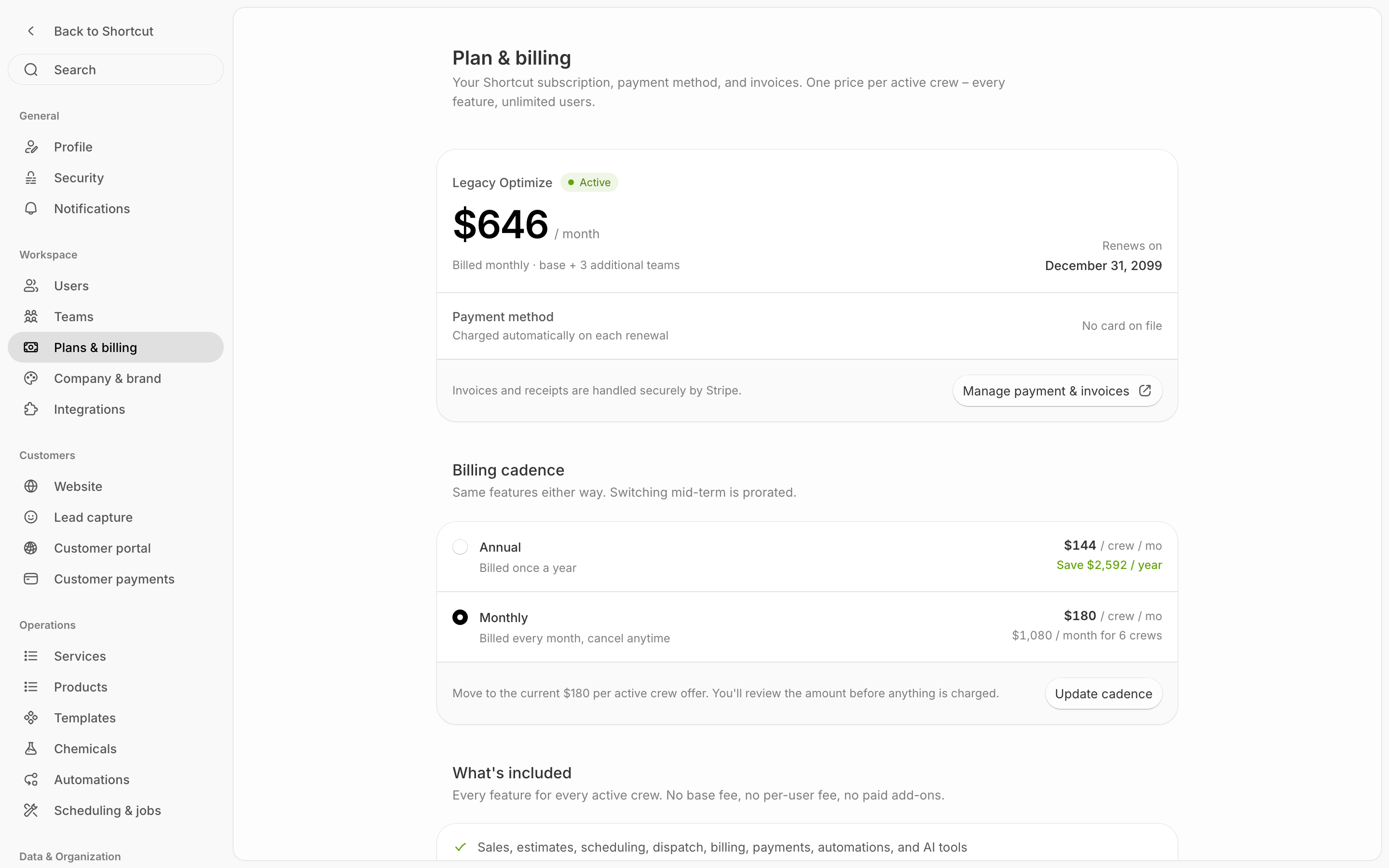
Plans & billing: your subscription at the top, then how you're billed and what's included.
## Pricing
| | Monthly | Annual (save 20%) |
| ------------ | ---------- | ----------------------------------- |
| **Per crew** | $180/month | $144/month, billed $1,728/crew/year |
A **crew** is a team you dispatch (set up in [Settings → Teams](/readme/configuration/workforce-users-+-roles-+-teams.md#teams)). You pay for each active crew: a team with at least one active person on it. Your bill always covers at least one crew. Add or remove crews any time, and your subscription adjusts.
## Free trial
Every new account gets a **14-day free trial**, with no credit card required. Every feature is included.
During the trial, company admins see **Trial ends in N days** above the navigation. Click it to open Plans & billing. When the trial is over it reads **Trial expired**.
## Your subscription
The card at the top of the page shows your plan, **Everything included** (or the name of an older plan you're still on), with a status badge:
* **Free trial**: the page shows how many days are left and the date the trial ends.
* **Active**: the page shows what you pay, how many active crews it covers, and the **Renews on** date.
* **Trial ended**: the page shows **Access paused** until you add a payment method.
* **Past due**: a payment didn't go through. Shortcut retries it automatically, and the page shows the date your access lasts until.
* **Cancels** *date* or **Closure scheduled**: your plan ends at the end of the current term. You won't be charged again.
* **Paused** and **Canceled**: your plan has stopped. The page shows **Access paused**.
Under it, **Payment method** shows the card on file, such as **•••• 4242**, or **No card on file**.
The button at the bottom of the card depends on where you are:
| Button | When you see it | What it does |
| ----------------------------- | ------------------------- | ---------------------------------------------------------------------------------- |
| **Add payment method** | During or after the trial | Opens Stripe's secure checkout. The note beside it shows what you'll pay and when. |
| **Manage payment & invoices** | On a paid plan | Opens Stripe, where you change your card and download invoices and receipts. |
| **Update payment method** | When a payment failed | Opens Stripe to change your card. Updating it retries the payment right away. |
| **Reactivate plan** | After your plan has ended | Opens Stripe's checkout to start paying again. Your data is still there. |
After checkout, a green note at the top of the page says *Your plan is now active.*
## Billing cadence
**Billing cadence** is how often you pay. Both options include the same features.
* **Annual**: billed once a year, $144 per crew per month. The row shows how much you save each year.
* **Monthly**: billed every month, $180 per crew per month. Cancel anytime. The row shows your monthly total for your crews.
A **Current** badge marks the one you're on.
**During the trial,** pick the cadence you want. Your checkout uses it when you click **Add payment method**.
**On a paid plan,** switch like this:
{% stepper %}
{% step %}
### Pick the other cadence
Click **Annual** or **Monthly**. An **Update cadence** bar opens at the bottom of the card.
{% endstep %}
{% step %}
### Click Update cadence
Shortcut asks Stripe what the switch costs and shows each line, the amount **Due now**, and the card it's charged to. Nothing is charged yet.
{% endstep %}
{% step %}
### Confirm
Click **Confirm and pay** (or **Confirm change** when nothing is due now). Click **Cancel** to keep your current cadence.
{% endstep %}
{% endstepper %}
Switching partway through a term is prorated. While a payment is past due, you can't change cadence until the payment goes through.
{% hint style="info" %}
**On an older plan?** The **Update cadence** bar is open from the start and offers to move you to the current $180-per-crew plan. You see the amount before anything is charged.
{% endhint %}
## What's included
**What's included** lists the plan's highlights. Click **Show all features** to see every feature, grouped by area, plus the price, annual price, users and trial at a glance. **Hide features** folds it back up.
## Close your company account
To stop using Shortcut for the whole company, scroll to **Danger Zone** and click **Close company account**. It's there while you're on a paid plan or on the trial.
{% stepper %}
{% step %}
### Click Close company account
Shortcut explains what happens: closure takes effect at the end of your current term (or when your trial ends). You won't be charged again, your data stays intact, and your team stops getting Shortcut emails.
{% endstep %}
{% step %}
### Enter your current password
Type your **Current password** and click **Schedule closure**.
{% endstep %}
{% endstepper %}
Until the closure date, your team keeps access, but Shortcut stops sending them emails. The row reads **Company closure scheduled**. Changed your mind? Click **Reactivate company account**, enter your password, and click **Reactivate**. Billing continues on your current plan.
To close only your own login, use **Security → Deactivate account** instead. See [Your account](/readme/your-account.md).
{% hint style="warning" %}
If your trial ends or a payment fails, some features are restricted until billing is resolved. Open Plans & billing and use the button on the subscription card to fix it.
{% endhint %}
{% hint style="info" %}
Still stuck? Email **** with a screenshot of your Plans & billing page.
{% endhint %}