> For the complete documentation index, see [llms.txt](https://docs.shortcutco.com/llms.txt). Markdown versions of documentation pages are available by appending `.md` to page URLs; this page is available as [Markdown](https://docs.shortcutco.com/readme/configuration/templates.md).

# Templates

Templates let you reuse the same package of services and how often each one repeats (its cadence), so you can quote faster. [Open Templates →](https://shortcutco.com/settings/templates)

{% hint style="info" %}
Looking for saved text and email answers? Those are **Settings → Customers → Message templates**. See [Message templates](https://docs.shortcutco.com/readme/messaging-inbox.md#message-templates).
{% endhint %}

<figure><img src="https://2299783971-files.gitbook.io/~/files/v0/b/gitbook-x-prod.appspot.com/o/spaces%2FOhi7KtJ4vY1pDKwWu5SV%2Fuploads%2Fgit-blob-1087a474c4f4cd81528710258e9850ec76acee70%2Fconfig-templates.png?alt=media" alt="Templates list showing a saved template with its name, services, and active status"><figcaption><p>Settings → Templates — your saved service packages. Click "Create template" to build a new one.</p></figcaption></figure>

## What templates do

* Bundle services together
* Set cadence per service:
  * One-off, or
  * Recurring every X days, weeks, months, or years
* Store **service options/alternatives** (e.g., Gold vs Silver tiers)
* Support **drag-to-reorder** so you control the display order

## Create a template

{% stepper %}
{% step %}

### Open Templates

Open **Settings → Operations → Templates**. [Open Templates →](https://shortcutco.com/settings/templates)
{% endstep %}

{% step %}

### Create a new template

Click **Create template**.

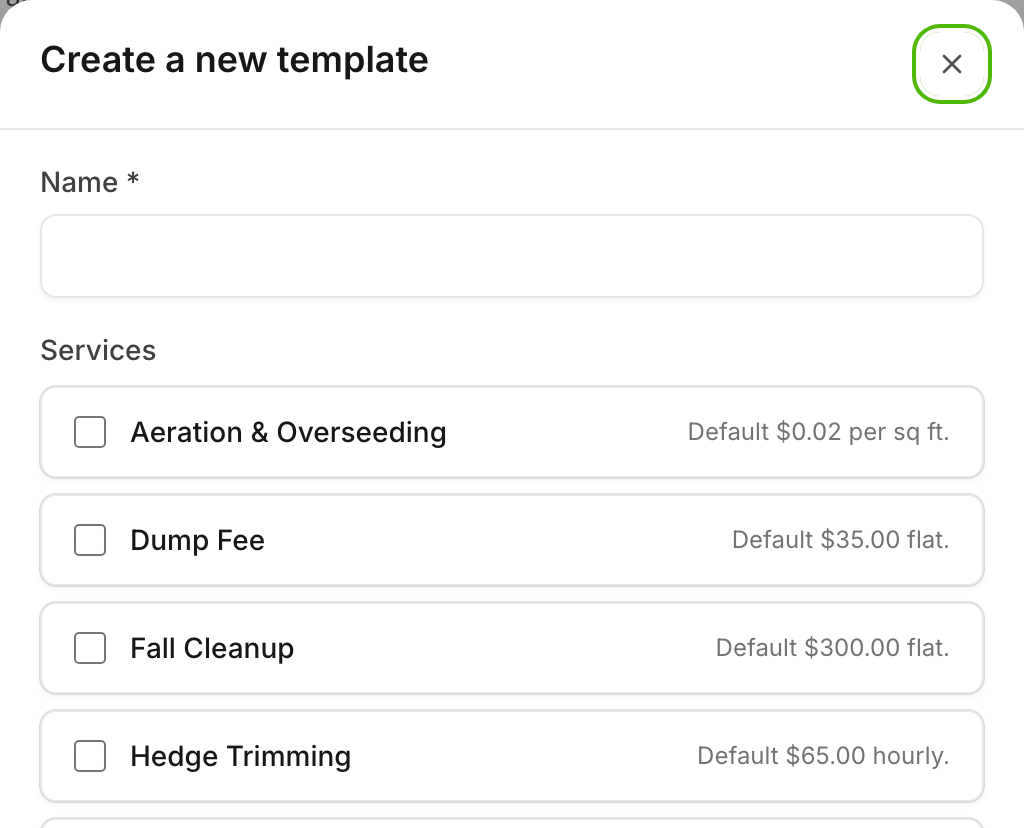
<figure><img src="https://2299783971-files.gitbook.io/~/files/v0/b/gitbook-x-prod.appspot.com/o/spaces%2FOhi7KtJ4vY1pDKwWu5SV%2Fuploads%2Fgit-blob-58f6e15d048b9409488aa4b0012c6dc66d1c2333%2Fconfig-template-create.png?alt=media" alt="Create a new template window showing template name, service selection with pricing and cadence options"><figcaption><p>The template creation window — name your template, select services, set rates and cadence (one-off or recurring), and mark services as optional.</p></figcaption></figure>
{% endstep %}

{% step %}

### Add services

Add services. Drag to reorder as needed.
{% endstep %}

{% step %}

### Set cadence

Set cadence for each service.

A flat-fee service [priced by size](https://docs.shortcutco.com/readme/configuration/services-pricing-structures.md#price-by-size-flat-fee-services) shows its range under the rate, for example *Priced by lawn size: $45–$80 per visit.* Leave its rate blank and each estimate prices it from the property's size.
{% endstep %}

{% step %}

### Save

Click **Save**. Shortcut keeps the order you set.
{% endstep %}
{% endstepper %}

## Use templates in an estimate

On the estimate, click **Use a template** next to the service search and pick one.

## Still stuck?

<details>

<summary>Contact support</summary>

Email **<hello@shortcutco.com>** with the template name you're trying to build.

</details>