> For the complete documentation index, see [llms.txt](https://docs.shortcutco.com/llms.txt). Markdown versions of documentation pages are available by appending `.md` to page URLs; this page is available as [Markdown](https://docs.shortcutco.com/readme/dashboard.md).
# Dashboard
The Dashboard is your "how is my business doing?" home screen.
The Dashboard is your "how is my business doing?" home screen: money, today's work, and follow-ups in one place. Open it to start your day, to see who needs a follow-up, or to check margins after logging costs. [Open Dashboard →](https://shortcutco.com/dashboard)
## What you'll see
Pick a period at the top — **Week**, **Month**, **Quarter**, **YTD**, or **Custom** — and switch on **vs last year** to compare with the same stretch a year ago. The dates covered show on the left (**Sep 1 – 24**).
**How am I doing?**
* **Effective hourly rate** — revenue ÷ crew hours, drive time included. Opens the Crew Scoreboard.
* **Net profit** 🔒 — what you kept after labor, materials, and overhead, with your margin. See [Net profit and estimated labor](#net-profit-and-estimated-labor). Opens Job Costing.
* **Revenue paid** — money received, less refunds.
* **Revenue earned** — work completed in the period, invoiced or not.
* **MRR** (monthly recurring revenue) — what your recurring jobs are worth per month, and how many there are.
Click **Revenue paid** or **Revenue earned** to open the Revenue report for the same period; the totals match.
**Where is my business?**
* **Revenue by service** 🔒 — which services earn the most, each with its measured margin. Click a service for the Revenue report filtered to it.
* **Today strip** — today's date, how many visits are on today's schedule (scheduled, rescheduled onto today, or already completed), and how many **Need attention** because they're flagged for rescheduling, with **Open dispatch ›**.
* **Outstanding** — what customers still owe, with an aging bar. Opens A/R Aging.
* **Average project size** and **Customers** — recurring vs one-off, new and lost this period, and retention.
* **At-risk customers** (red text in a customer's [pinned note](/readme/leads-prospects-customers/customers-overview-+-importing.md#mark-a-customer-as-unhappy) keeps them here for as long as it's there), and sometimes an **Insight** card worth a look.
* **Pipeline** — see [Pipeline numbers](#pipeline-numbers).
* **Tasks** — your open to-dos ([Tasks](/readme/dashboard/tasks-to-dos.md)).
* **Recent Activity** — the latest completions, payments, and customer events.
New accounts also see the **onboarding checklist** until setup is complete.
The Dashboard puts money, workload, and follow-ups in one place.
## How fresh are these numbers?
Above the money tiles you'll see when they were last worked out — **"Updated 2 hours ago"** — and a **Refresh** button.
* The summary is recalculated **every hour** in the background.
* Click **Refresh** any time you want it now. If it's taking a while, Shortcut says *"Still updating — you can safely leave this page"* and finishes without you.
* If a refresh fails, your **last good numbers stay on screen** rather than the page going blank. The button becomes **Try again**.
* The **Today strip, tasks, and recent activity are always live** — they aren't part of the hourly summary.
The first time you open the Dashboard on a new account, you'll see *"Calculating your business summary…"* while the first one is built.
## How periods are measured
Periods run on **your company's local calendar days**. "This month" starts at midnight where you work and runs through today.
Revenue follows the same rules everywhere in Shortcut — the Dashboard, [Reports](/readme/reports.md#how-revenue-is-dated), [Costs](/readme/costs-and-profitability.md), and the weekly digest email:
* **Revenue earned** lands on the moment each visit was marked complete, in your time zone. A job finished at 8 pm on the last day of the month counts in that month — and so does its line on the invoice.
* **Revenue paid** lands on the day the money arrived.
* Work on a draft invoice is already earned; voided invoices count nowhere.
So **Month** on the Dashboard, the Costs month summary, and the Revenue report for the same month show the same earned revenue. Right after a job is completed the Dashboard can briefly lag behind; click **Refresh** if you need it now.
## Net profit and estimated labor
Under **Net profit** you'll see *"Includes estimated labor when time is missing."* When a visit has recorded time — Time Clock punches, or an arrival and completion time — Shortcut uses it. When it doesn't, the visit's estimated duration stands in, so the total isn't missing labor the crew clearly spent.
To see how much of the period is measured and how much is estimated, click **Net profit**. It opens [Job Costing](/readme/reports.md#reading-job-costing), which shows the same **Net profit** next to **Measured net** — the profit on measured visits only.
If labor can't be priced yet because no pay rates are set up, the tile shows your margin **before labor** instead — *"Materials & overhead only — labor isn't set up yet."* — with **Add pay rates to sharpen this number ›**.
## Pipeline numbers
* **Active leads** — leads open right now. **+N this week** is how many arrived in the last seven days.
* **Quotes out** — the value of estimates still waiting on an answer, with how many are open and how many have waited **over 14 days**.
* **Close rate** — of the estimates you sent in the last 90 days, the share accepted so far. Click it to open Estimate Conversion for the same 90 days — the close rates match.
* **Booked · 7d** — visits on the schedule from today through the next six days, including visits you've rescheduled. The line underneath gives the 14- and 30-day counts; click for their dollar value.
* **Capacity · 2 wks** — how full your crews are over the next two weeks, measured against a working day that allows for drive time.
{% hint style="info" %}
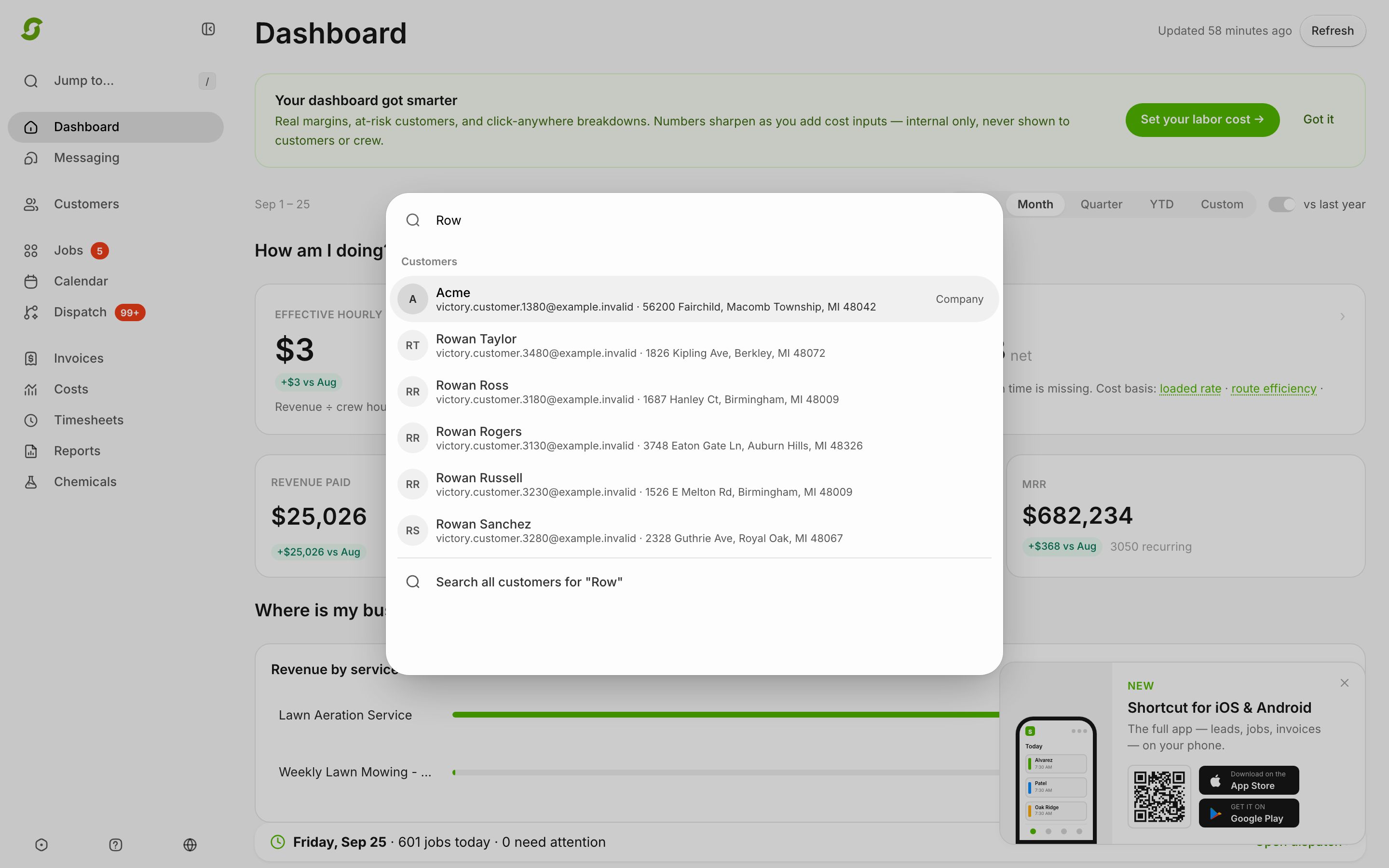
**Tip: press `/` anywhere** (or tap the search icon on mobile) to open **Jump to…** — search customers by name, email, phone, or address and jump straight to their profile, jobs, or invoices.
{% endhint %}
Jump to… finds anyone in a keystroke.
{% hint style="info" %}
Still stuck? Email **** with a screenshot of your [Dashboard](https://shortcutco.com/dashboard).
{% endhint %}