> For the complete documentation index, see [llms.txt](https://docs.shortcutco.com/llms.txt). Markdown versions of documentation pages are available by appending `.md` to page URLs; this page is available as [Markdown](https://docs.shortcutco.com/readme/dispatch/messaging-from-dispatch.md).
# Messaging from Dispatch (SMS + email)
Text or email the customers on today's board — with a check of exactly who will receive it before anything sends.
Rain day? Crew running late? Select the stops and send everyone one message. Dispatch checks each recipient first, so you know who's getting it and who isn't, and it never sends to someone who has opted out.
{% hint style="info" %}
This is for **one-off updates you write yourself**. Automatic messages such as "we're coming tomorrow" reminders and review requests live in [Automations](/readme/automations.md). Replies from customers land in the [Messaging inbox](/readme/messaging-inbox.md).
{% endhint %}
## Sending an update
{% stepper %}
{% step %}
### Select the stops
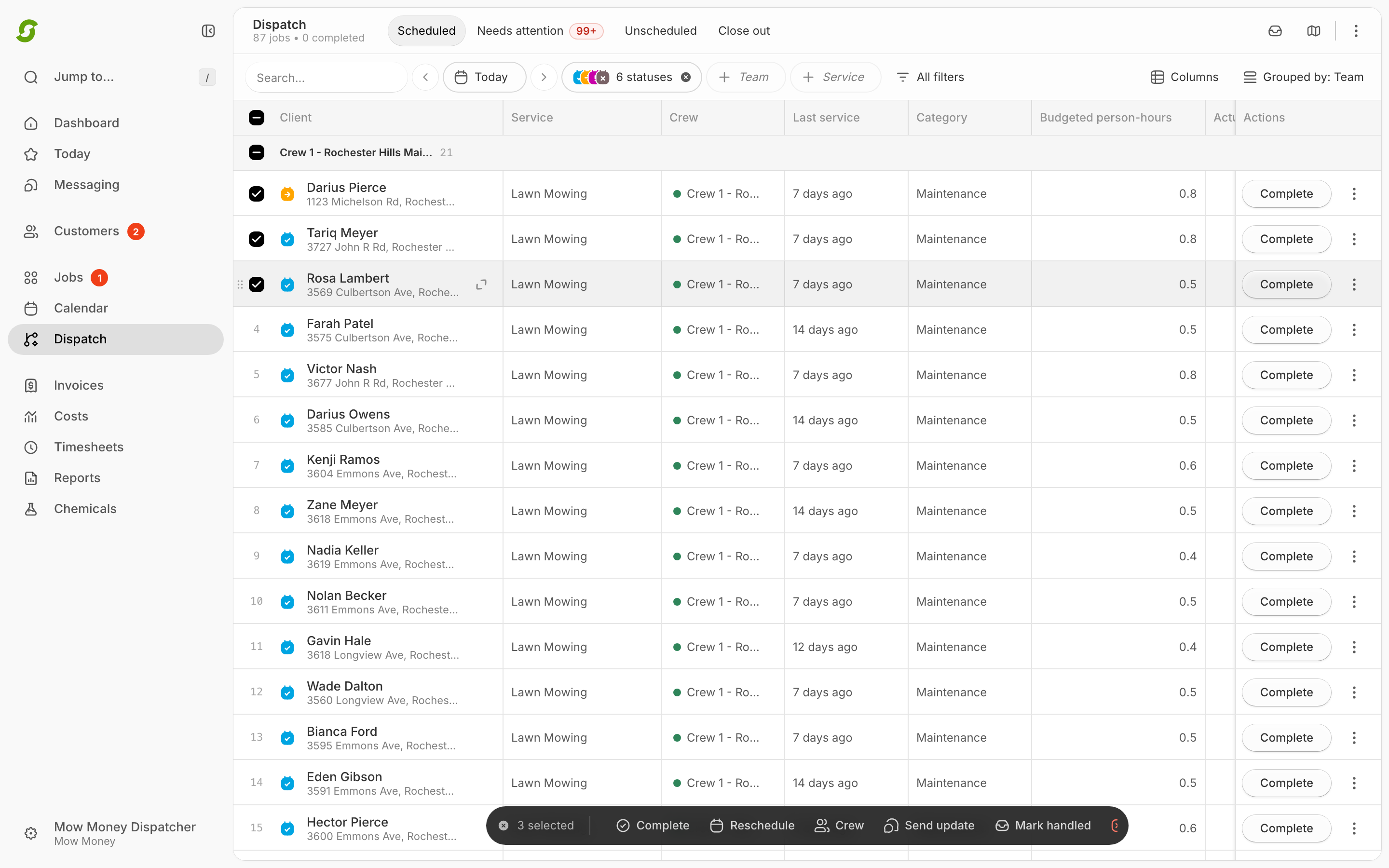
On the Dispatch board, tick the stops you want (hover a row and its route number becomes a checkbox). Shift-click selects a range, and the checkbox on a crew's lane header selects the whole crew. Click **Send update** on the black toolbar that appears at the bottom.
To message a single customer, use the **⋯** menu on their row → **Send update** instead.
Tick the stops, then click Send update on the black toolbar.
{% endstep %}
{% step %}
### Choose SMS or email
The **Send update to customers** window opens, listing the customers you selected. Under **Send via**, pick **SMS** or **Email**. The number next to each is how many of those customers have a phone number or email address on file. You send on one channel at a time.
Emails go out with the subject *"Dispatch update from \[your company name]"*.
{% endstep %}
{% step %}
### Write the message, or pick a template
Type your message, or open **Choose a message template** and pick one you've saved. Picking a template only fills in the text; your selected stops stay selected.
Type **@** to insert a merge field, so each customer gets their own name and details:
| Field | Becomes |
| -------------------------------- | ----------------------- |
| First name, Last name, Full name | The customer's name |
| Scheduled date | The date of their visit |
| Service name | What they're getting |
| Service address | Where |
| Crew name | Who's coming |
| Company name | Your company |
For SMS, a counter under the box shows the character count and how many text segments it will use. Keep it under one segment (about 160 characters) where you can.
Written something you'll use again? Click **Save this message as a template**.
{% endstep %}
{% step %}
### Review recipients
Click **Review recipients**. Dispatch checks every customer and shows a one-line summary: **"14 of 16 will get this · 2 held back — Review the 2"**. Click through and each held-back customer is listed with the reason:
* **No phone or email on file**
* **Duplicate contacts merged** — two customers share a number, so it goes once
* **Opted out of texts** — they replied STOP at some point
* **Blocked or suppressed**
* **Unresolved merge value** — for example you used *Crew name* and this customer's visit has no crew yet. Fix the stop, or click **Exclude** next to their name.
Held-back customers are skipped; everyone else still gets the message. On the right, **Recipient preview** shows the exact message one customer will receive. Use **Previous** / **Next** to flick through, and **Longest** / **Shortest** to check the extremes.
Then tick **This is a service update, not a marketing message.** Dispatch messaging is for service updates only. Marketing texts need a different kind of consent that this tool doesn't collect.
{% endstep %}
{% step %}
### Send
Click **Continue with 14**. A confirmation shows the channel, the count, and the rendered example. Click **Send SMS to 14** (or **Send email to 14**).
For **50 or more** recipients, you'll be asked to **type the number** to confirm before the send button turns on.
{% endstep %}
{% endstepper %}
## Quiet hours
Between **8:00 pm and 8:00 am** in your company's time zone, the window shows **Quiet hours are active** and won't send until you tick **Send now anyway**. Use it for genuine emergencies; nobody loves a 6 am text.
## After you send
You'll see **Customer update queued**. Delivery happens in the background, and the results appear in the **Bulk operation progress** dock at the bottom of Dispatch:
* **12 delivered**, **2 sent, awaiting carrier**, **1 opted out, not sent**, **1 failed**
* Failed customers are listed with the reason, such as *carrier rejected the number* or *the email address bounced*.
* Click **Retry the 1 that failed** to try just the failures again. Customers who already got the message are never sent it twice.
The dock keeps results for the rest of the day, even if you reload the page.
## Message templates
Open the template picker in the Send update window and choose **Manage templates…**. You can create templates for **SMS** or **Email**, edit them, and **Deactivate** ones you no longer use (they're never deleted, so past sends stay on record). Templates can use the same merge fields as a one-off message.
## Limits
* Up to **1,000 recipients** per send. Bigger than that, split it up.
* Up to **1,600 characters** per message.
* One channel per send. To reach everyone, send once by SMS and once by email; anyone without a phone number is listed under **No phone or email on file** on the SMS send so you know who to email.
* Writing messages is **desktop only**. On a phone, **Send update** tells you to switch to a computer.
## Related pages
* [Dispatch overview](/readme/dispatch.md)
* [Automations](/readme/automations.md)
* [Messaging inbox](/readme/messaging-inbox.md)
Still stuck?
Email **** with the date, what you were trying to send, and a screenshot of the review step.