> For the complete documentation index, see [llms.txt](https://docs.shortcutco.com/llms.txt). Markdown versions of documentation pages are available by appending `.md` to page URLs; this page is available as [Markdown](https://docs.shortcutco.com/readme/dispatch/split-and-shared-visits.md).
# Split visits and sending more than one crew
Move one service to another crew, or send several crews to the same stop, and still bill the customer once.
Some stops don't belong to one crew. The mowing crew and the tree crew are both going, or a big property needs two crews to finish in a day. Dispatch handles both without turning one visit into two.
## Which one do you want?
* **Split visit** — the stop has **several services** and different crews should do them. Mowing goes to one crew, hedge trimming to another. Each service moves; the rest of the visit stays put.
* **Add a crew** — the work stays as it is, you just want **more hands on the same stop**. A second crew joins the visit.
Both live in the stop's **⋯** menu in Dispatch. If one is greyed out, the reason is shown next to it, for example **1 service** (nothing to split), **Visit complete**, **No crew**, or **Crew on site** (someone has already checked in).
## Split a visit
Open the **⋯** menu and choose **Split visit…**.
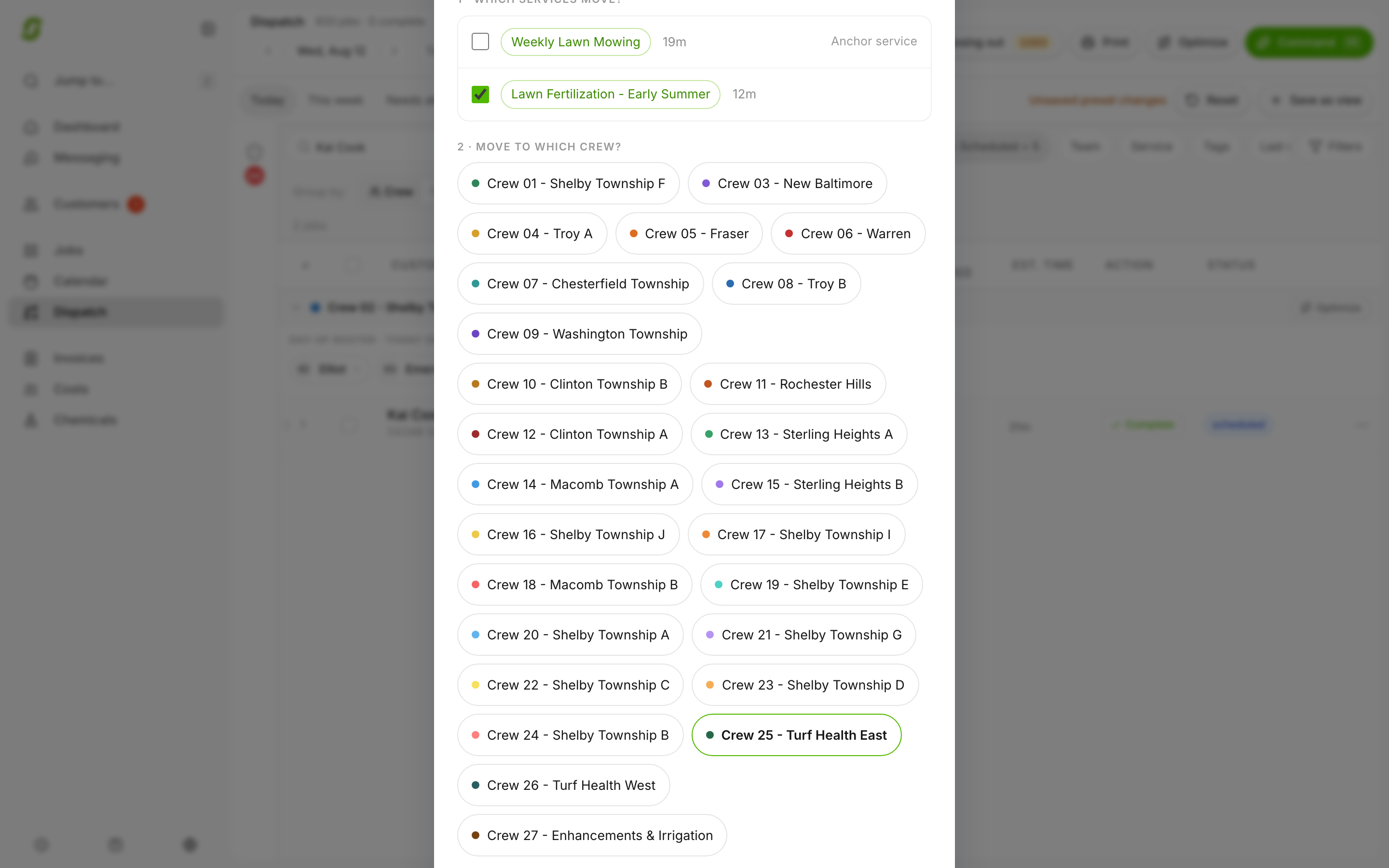
1. **Which services move?** Tick the ones going to the other crew. You have to leave at least one behind; if everything is moving, that's a reassignment, not a split.
2. **Move to which crew?** Pick the crew.
3. Click **Review split**, check the **Stays** and **Moves** rows, then **Split visit**.
The moved service lands at the end of the other crew's run for the day. Splits are same-day only; to move a service to another date, use **Reschedule**. A split never shows as double-booked on [Needs attention](/readme/dispatch/needs-attention.md).
Splitting a visit: pick the service that moves and the crew it moves to. The rest of the visit stays put.
## Add a crew
Open the **⋯** menu and choose **Add a crew…**. Tick every crew that should join and click **Add crew** (or **Add 2 crews**). Each crew gets the stop on their Today screen and clocks their own time.
To take a crew back off before they've started, use **Remove crew** on that crew's copy of the stop. Once a crew has checked in, added photos, or recorded anything, their portion can't be removed.
## What the customer sees
One visit and **one invoice**, no matter how many crews were on it.
{% hint style="info" %}
**The invoice is created when the whole visit is finished, not when the first crew leaves.** If the mowing crew finishes at ten and the tree crew is there until three, nothing bills until three. Undo works the same way: it puts the whole visit back, not one crew's piece.
{% endhint %}
Discounts, prepay, review requests, and automations all treat the stop as one visit too. A customer doesn't get two review-request texts because two crews showed up.
## In your cost reports
Behind the single invoice, Shortcut splits the visit's revenue, materials, labor, and overhead across the crews that worked it. The per-crew numbers add back up to the visit, so crew-level cost and margin numbers stay accurate when work is shared.
## Related pages
* [Dispatch overview](/readme/dispatch.md)
* [Crew ownership (recurring jobs)](/readme/dispatch/crew-ownership.md)
* [Mark a job complete (and what happens next)](/readme/jobs-and-scheduling/mark-a-job-complete-and-what-happens-next.md)
Still stuck?
Email **** with the customer name, the date, and which crews should be on the stop.