> For the complete documentation index, see [llms.txt](https://docs.shortcutco.com/llms.txt). Markdown versions of documentation pages are available by appending `.md` to page URLs; this page is available as [Markdown](https://docs.shortcutco.com/readme/finances-invoices-and-payments/customer-email-preferences.md).

# Customer email preferences and invoice delivery

Customers can choose which emails they get from your company. There are three kinds: billing, marketing, and service. A choice applies to your company only. It doesn't change what they get from anyone else who uses Shortcut, and it never affects text messages.

This page covers what your customer sees, what you see, and how to get an invoice to someone who has turned billing emails off.

## When to use this

{% hint style="info" %}

* A customer says they've stopped getting your invoices (start with [The Delivery box on an invoice](#the-delivery-box-on-an-invoice))
* A customer asks you to stop emailing them (see **Record a change the customer asked for**)
* A customer wants invoices by paper, phone, or the customer portal instead of email (see **Record how they'll get invoices**)
  {% endhint %}

## The three kinds of email

| Kind                 | What's in it                                                                                                                                                                                                                                                                                                                    |
| -------------------- | ------------------------------------------------------------------------------------------------------------------------------------------------------------------------------------------------------------------------------------------------------------------------------------------------------------------------------- |
| **Billing emails**   | Invoices, receipts, payment reminders, and price-change notices, including the built-in **Invoice Overdue**, **Invoice Paid**, and **Payment Failed** automations, and campaigns about an invoice or payment.                                                                                                                   |
| **Marketing emails** | Review requests, the built-in **New Lead Welcome**, and campaigns about a customer or lead, such as a seasonal offer.                                                                                                                                                                                                           |
| **Service emails**   | Dispatch updates, proposals, visit updates from the customer portal, the built-in proposal and job automations (**Proposal Sent**, **Proposal Reminder**, **Proposal Voided**, **Job Scheduled**, **Job Rescheduled**, **Job Canceled**, and **Day-Before Reminder**), and campaigns about a visit, service, estimate, or task. |

### Which kind a campaign email is

A campaign you build in **Automations** takes its kind from the start that began the run.

| The run began with…                                                                                                                                              | Kind          |
| ---------------------------------------------------------------------------------------------------------------------------------------------------------------- | ------------- |
| An **Invoices & payments** event: an invoice created, sent, paid, or overdue, a payment attempt failed, a payment recorded, or a card added, updated, or removed | **Billing**   |
| **Day before service**, any **Estimates**, **Services & visits**, or **Staff work** event, or **SMS received**                                                   | **Service**   |
| Any other event: **Customers** and **Tags & fields** events, **Customer autopay setting changed**, and the **Automation message** events                         | **Marketing** |
| A **When customers meet conditions** or **On a date or schedule** start whose **Starting record** is **Invoice**                                                 | **Billing**   |
| The same, with **Starting record** **Visit**, **Job**, **Estimate**, or **Task**                                                                                 | **Service**   |
| The same, with **Starting record** **Customer** or **Property**                                                                                                  | **Marketing** |

So the **Overdue invoice recovery** template sends billing emails, **Estimate follow-up** and **Day-before service reminder** send service emails, and **Seasonal service offer** and **Customer reactivation** send marketing emails. A campaign with more than one start can send a different kind depending on which start began the run.

Customer portal invitations and sign-in links aren't covered by these choices, so a customer who turns everything off can still get into the portal.

{% hint style="warning" %}
Turning off billing emails doesn't change what the customer owes. The balance stays due, autopay keeps running, and the invoice link still works. You just need to get invoices to them another way.
{% endhint %}

## What your customer sees

If you use the [customer portal](/readme/customer-portal.md), customers can change their choices themselves. They open **Account** and click **Manage billing and marketing email preferences**. That opens **Email preferences**, with a card for each kind of email.

Each card shows where things stand:

* **No explicit choice recorded** — they haven't chosen. Emails go out as normal. Most customers look like this.
* **Permission confirmed** — they've said yes.
* **Turned off** — they've said no.

They click **Turn off** or **Turn on** (**Confirm permission again** if it's already on), then **Confirm and save** in the box that opens. Nothing changes until they confirm, and saving doesn't resend any messages or change an invoice.

When a customer turns off **Billing emails**, they're asked for a **Preferred follow-up**:

* **Arrange with the company later**
* **Paper copy**
* **Phone call**
* **Customer portal**
* **Text, only if already authorized**

The billing card then says **Company follow-up required**. That's your cue to agree with them how they'll get invoices.

Good to know:

* The bottom of the page says *Need another delivery method? Contact \[your company].* with your **Office email** from **Settings → Customer portal** (or, if that's blank, the email of the first admin on your Shortcut account) and the **Phone number** from **Company & brand**.
* If the customer signed in to the portal more than 15 minutes ago, they're asked to sign in again before saving.

### The line at the bottom of billing emails

Invoices, receipts, payment reminders, and price-change notices end with *Questions about this message? Reply to this email to reach \[your company].* Replies go to the email address of the first admin on your Shortcut account. There's no unsubscribe link on billing emails, so one click can't stop a customer's invoices. A customer who wants fewer emails can change their choices in the portal, or ask you to record it for them.

## What you see: ⋯ → Email preferences

Open the customer's profile and choose **⋯ → Email preferences**. You'll see the same three cards your customer sees, with their address partly hidden (for example *For j…@example.com*). Above the cards is a reminder to record only what the customer asked for. Changing a preference doesn't send an invoice, turn on text messages, or clear a spam complaint.

Below the cards:

* **Invoice delivery** — what happened to recent invoice emails and texts for this customer, each with a link to the invoice.
* **Preference history** — the last 30 changes: when (in UTC), which kind, on or off, who made it (the customer or your staff), and how it was confirmed.

<figure><img src="https://2299783971-files.gitbook.io/~/files/v0/b/gitbook-x-prod.appspot.com/o/spaces%2FOhi7KtJ4vY1pDKwWu5SV%2Fuploads%2Fgit-blob-0604c67242b5b9d4f13d0f10981943480e1d71fb%2Fcustomer-email-preferences-office.png?alt=media" alt="Email preferences page opened from a customer&#x27;s profile, with Billing, Marketing and Service email cards each showing No explicit choice recorded and Turn off / Turn on buttons, followed by Invoice delivery and Preference history"><figcaption><p>The office view of a customer's email preferences, with a card for each kind of email. The demo company shown here has customer communications paused, which adds a note to each card.</p></figcaption></figure>

### Record a change the customer asked for

Only do this when the customer has asked you to.

{% stepper %}
{% step %}

#### Click Turn off or Turn on

On the card for the kind of email they asked about.
{% endstep %}

{% step %}

#### Say how they asked

Under **How did the customer confirm this?** pick **On the phone**, **In person**, or **Written request**. For billing opt-outs, also pick the **Preferred follow-up**.
{% endstep %}

{% step %}

#### Click Confirm and save

{% endstep %}
{% endstepper %}

Turning a kind of email back on doesn't resend anything that was held back while it was off.

### Record how they'll get invoices

When the billing card says **Company follow-up required**, agree with the customer how they'll get invoices. Then click **Record agreed delivery method**, pick **Paper copy**, **Phone call**, **Customer portal**, or **Text, only if already authorized**, say how they confirmed, and click **Confirm and save**. Billing emails stay off, and the follow-up note goes away.

**Text, only if already authorized** doesn't give you permission to text them. If they've replied STOP, texts stay off.

## The Delivery box on an invoice

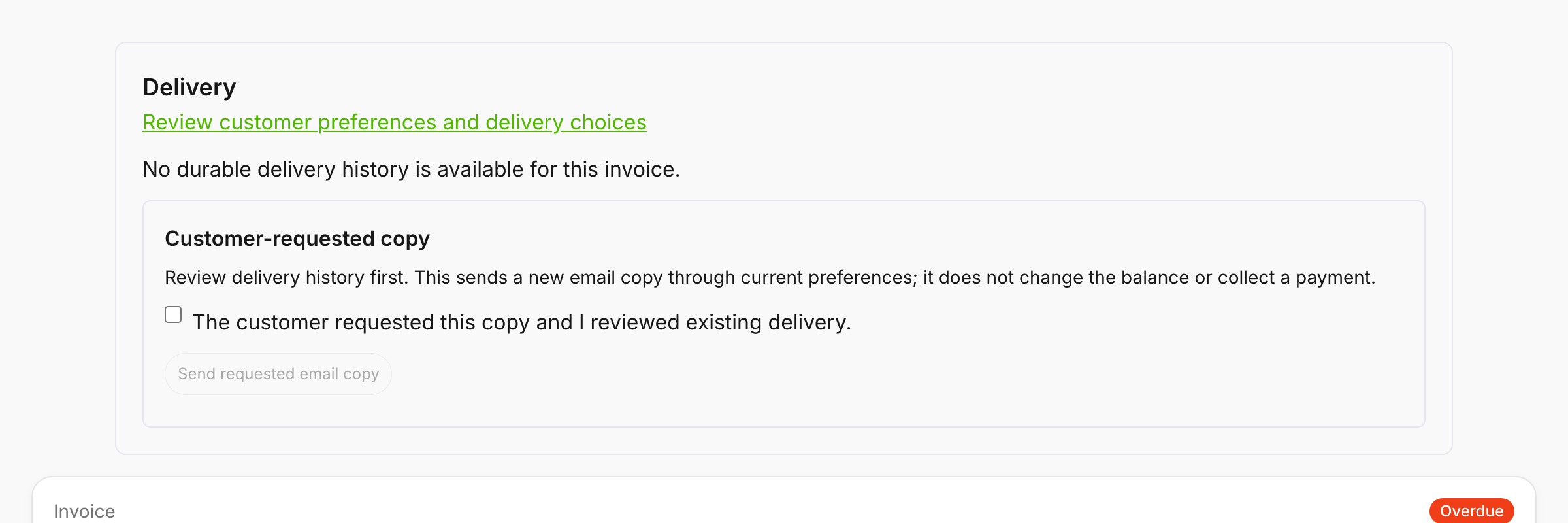
In **Invoices**, click an invoice number to open it. **Delivery** is the first box on the page. Its link, **Review customer preferences and delivery choices**, opens the customer's email preferences.

Below the link is an entry for each email or text for this invoice: what happened to it (for example **email: skipped**) and why. Each entry ends with a line such as **Latest provider attempt: accepted** or **No provider submission recorded.**, which says whether it was handed to our email or text service.

| What it says                                  | What it means                                                                                        |
| --------------------------------------------- | ---------------------------------------------------------------------------------------------------- |
| **pending**, **preparing**, or **attempting** | It's on its way.                                                                                     |
| **accepted**                                  | Handed off to our email or text service for sending.                                                 |
| **delivered**                                 | The email or text service says it arrived.                                                           |
| **skipped**                                   | Shortcut didn't send it. The line under it says why.                                                 |
| **failed**                                    | It didn't go.                                                                                        |
| **unknown**                                   | Shortcut can't tell whether it went. Don't send another copy until you've checked with the customer. |

Reasons you might see under a line:

| Reason                                                                                                 | What to do                                                                                                                                                                                     |
| ------------------------------------------------------------------------------------------------------ | ---------------------------------------------------------------------------------------------------------------------------------------------------------------------------------------------- |
| *Billing email is turned off. Arrange another delivery method.*                                        | The customer turned billing emails off. Get the invoice to them another way.                                                                                                                   |
| *A spam complaint blocks email. Use another delivery method.*                                          | They marked one of your emails as spam. See [When a customer's email stops working](/readme/leads-prospects-customers/customers-overview-+-importing.md#when-a-customers-email-stops-working). |
| *The address rejected delivery. Verify the address or use another method.*                             | The email bounced. Fix the address on their profile.                                                                                                                                           |
| *The email provider still restricts delivery. Permission and provider restoration are separate steps.* | Our email service is still blocking their address. Email us.                                                                                                                                   |
| *Email delivery is paused for review.* or *Customer communications are paused for this company.*       | Shortcut has paused email for your company. Email us.                                                                                                                                          |
| *The provider outcome is unknown. Investigate before sending another copy.*                            | Same as **unknown** above.                                                                                                                                                                     |

<details>

<summary>Short labels you might see instead of a reason</summary>

* **channel not selected** — that channel wasn't chosen for this send.
* **invalid recipient** — no email or phone on file.
* **settled or void** — the invoice was already paid or voided.
* **payment pending** — waiting while the customer's payment goes through.
* **sms opt out** — they replied STOP.

</details>

{% hint style="info" %}
The Delivery box lists the invoice email and text, each **Remind**, and each requested copy. Emails from automations about the invoice, such as **Invoice Overdue** or an **Overdue invoice recovery** campaign, aren't listed here. For a campaign, check its **Activity** (see [Campaign results, activity, and receipts](/readme/automations/campaign-activity-and-receipts.md)).

An invoice with no delivery record shows *No durable delivery history is available for this invoice.* (on the customer's **Email preferences** page: *No durable delivery history is available.*). That's what you'll see for invoices sent before Shortcut started tracking delivery for your company. It doesn't tell you whether they arrived.
{% endhint %}

<figure><img src="https://2299783971-files.gitbook.io/~/files/v0/b/gitbook-x-prod.appspot.com/o/spaces%2FOhi7KtJ4vY1pDKwWu5SV%2Fuploads%2Fgit-blob-948d70dbb9908fe87a068eb674f973cc7b9392ef%2Finvoice-delivery-panel.png?alt=media" alt="Delivery box at the top of an invoice with the Review customer preferences and delivery choices link, the line No durable delivery history is available for this invoice, and a Customer-requested copy box with a checkbox and a Send requested email copy button"><figcaption><p>Delivery is the first box on the invoice page, with the Customer-requested copy box inside it.</p></figcaption></figure>

## Send a copy the customer asked for

Under the delivery lines is a **Customer-requested copy** box. It isn't there on drafts or void invoices.

{% stepper %}
{% step %}

#### Check what's already gone out

Look at the delivery lines first so you don't send a duplicate.
{% endstep %}

{% step %}

#### Tick the box

**The customer requested this copy and I reviewed existing delivery.**
{% endstep %}

{% step %}

#### Click Send requested email copy

You'll see *Requested copy saved.* Reload the page to see it under **Delivery**.
{% endstep %}
{% endstepper %}

The customer gets an email titled **Requested copy of invoice #1234** with a link to the invoice, which shows the current balance and whether it's paid. It works on paid invoices too, for a customer who wants one for their records.

A requested copy:

* is email only. It never sends a text.
* doesn't change the balance, take a payment, or touch autopay.
* still follows the customer's email preferences. If billing emails are off, it's skipped. Only turn them back on if the customer asks you to.
* waits while a customer's online payment is going through.

If you see *Review unresolved delivery, invoice status, or import review before requesting a copy.*, another email for this invoice is still on its way or its outcome is unknown, or the invoice is a draft, void, or waiting on import review.

## Common questions

<details>

<summary>A customer stopped getting invoices after they unsubscribed</summary>

Open their profile and choose **⋯ → Email preferences**. If **Billing emails** says **Turned off**, they turned them off for your company. Ask how they'd like invoices and click **Record agreed delivery method**. If they want emails again, click **Turn on** and say how they confirmed.

If the card says *The email provider still restricts delivery*, ask the customer to turn **Billing emails** on again, or record it for them with **Turn on**. That lets billing emails through. Marketing and service emails stay blocked until our email service lifts the block.

</details>

<details>

<summary>How do I get an invoice to someone who's turned billing emails off?</summary>

* **Text it.** **Remind** still texts them the invoice link, as long as they haven't replied STOP. The email part is skipped.
* **The portal.** If they use the customer portal, the invoice is under **Billing**.
* **Paper.** Open the invoice with **View** and print it.

</details>

<details>

<summary>Does this affect text messages?</summary>

No. Email choices never turn texts on or off. Customers stop texts by replying STOP.

</details>

<details>

<summary>Can I turn a customer's emails back on myself?</summary>

Only when they ask you to. Shortcut asks how they confirmed (on the phone, in person, or in writing) and keeps it in **Preference history**.

</details>

## Related pages

* [Remind / resend an invoice](/readme/finances-invoices-and-payments/remind-resend-an-invoice-after-24-hours.md)
* [How customers pay an invoice](/readme/finances-invoices-and-payments/how-customers-pay-an-invoice.md)
* [Customer portal](/readme/customer-portal.md)
* [Customers overview](/readme/leads-prospects-customers/customers-overview-+-importing.md#when-a-customers-email-stops-working)

<details>

<summary>Still stuck?</summary>

Email **<hello@shortcutco.com>** with the customer's name and the invoice number.

</details>