> For the complete documentation index, see [llms.txt](https://docs.shortcutco.com/llms.txt). Markdown versions of documentation pages are available by appending `.md` to page URLs; this page is available as [Markdown](https://docs.shortcutco.com/readme/finances-invoices-and-payments/customer-email-preferences.md).

# Customer email preferences and invoice delivery

Customers can choose which emails they get from your company. There are three kinds: billing, marketing, and service. A choice applies to your company only. It doesn't change what they get from anyone else who uses Shortcut, and it never affects text messages.

This page covers what your customer sees, what you see, and how to get an invoice to someone who has turned billing emails off.

## When to use this

{% hint style="info" %}

* A customer says they've stopped getting your invoices (start with [The Delivery box on an invoice](#the-delivery-box-on-an-invoice))
* A customer asks you to stop emailing them (see [Record a change the customer asked for](#record-a-change-the-customer-asked-for))
* A customer wants invoices by paper, phone, or the customer portal instead of email (see [Record how they'll get invoices](#record-how-theyll-get-invoices))
  {% endhint %}

## The three kinds of email

| Kind                 | What's in it                                                                                                                                                                                                                                          |
| -------------------- | ----------------------------------------------------------------------------------------------------------------------------------------------------------------------------------------------------------------------------------------------------- |
| **Billing emails**   | Invoices, receipts, payment reminders, and price-change notices, and automation emails about an invoice or payment (for example **Invoice Overdue**, **Invoice Paid**, **Payment Failed**, or an **Overdue invoice recovery** automation).            |
| **Marketing emails** | Review requests, and automation emails about a customer or lead, such as **New Lead Welcome** or a seasonal offer.                                                                                                                                    |
| **Service emails**   | Dispatch updates, estimates, visit updates from the customer portal, and automation emails about a visit, service, estimate, or task (for example **Estimate sent**, **Proposal Sent**, **Day-Before Reminder**, or a **Visit reminder** automation). |

### Which kind an automation email is

Every automation in **Automations**, including the ones Shortcut set up for you, takes its kind from the start that began the run.

| The run began with…                                                                                                                                              | Kind          |
| ---------------------------------------------------------------------------------------------------------------------------------------------------------------- | ------------- |
| An **Invoices & payments** event: an invoice created, sent, paid, or overdue, a payment attempt failed, a payment recorded, or a card added, updated, or removed | **Billing**   |
| **Day before service**, any **Estimates**, **Services & visits**, or **Staff work** event, or **SMS received**                                                   | **Service**   |
| Any other event: **Customers** and **Tags & fields** events, **Customer autopay setting changed**, and the **Automation message** events                         | **Marketing** |
| A **When customers meet conditions** or **On a date or schedule** start whose **Starting record** is **Invoice**                                                 | **Billing**   |
| The same, with **Starting record** **Visit**, **Job**, **Estimate**, or **Task**                                                                                 | **Service**   |
| The same, with **Starting record** **Customer** or **Property**                                                                                                  | **Marketing** |

So the **Overdue invoice recovery** template sends billing emails, **Estimate follow-up** and **Day-before service reminder** send service emails, and **Seasonal service offer** and **Customer reactivation** send marketing emails. An automation with more than one start can send a different kind depending on which start began the run.

Customer portal invitations and sign-in links aren't covered by these choices, so a customer who turns everything off can still get into the portal.

{% hint style="warning" %}
Turning off billing emails doesn't change what the customer owes. The balance stays due, autopay keeps running, and the invoice link still works. You just need to get invoices to them another way.
{% endhint %}

## What your customer sees

If you use the [customer portal](https://docs.shortcutco.com/readme/customer-portal.md), customers can change their choices themselves. They open **Account** and click **Manage billing and marketing email preferences**. That opens **Email preferences**, with a card for each kind of email.

Each card shows where things stand:

* **No explicit choice recorded** — they haven't chosen. Emails go out as normal. Most customers look like this.
* **Permission confirmed** — they've said yes.
* **Turned off** — they've said no.

They click **Turn off** or **Turn on** (**Confirm permission again** if it's already on), then **Confirm and save** in the box that opens. Nothing changes until they confirm, and saving doesn't resend any messages or change an invoice.

When a customer turns off **Billing emails**, they're asked for a **Preferred follow-up**:

* **Arrange with the company later**
* **Paper copy**
* **Phone call**
* **Customer portal**
* **Text, only if already authorized**

The billing card then says **Company follow-up required**. That's your cue to agree with them how they'll get invoices.

Good to know:

* The bottom of the page says *Need another delivery method? Contact \[your company].* with your **Office email** from **Settings → Customer portal** (or, if that's blank, the email of the first admin on your Shortcut account) and the **Phone number** from **Company & brand**.
* If the customer signed in to the portal more than 15 minutes ago, they're asked to sign in again before saving.

<figure><img src="https://2299783971-files.gitbook.io/~/files/v0/b/gitbook-x-prod.appspot.com/o/spaces%2FOhi7KtJ4vY1pDKwWu5SV%2Fuploads%2Fgit-blob-cc58ab732750214ad348bf1c93cfe74bc971bb03%2Fportal-email-preferences-mobile.png?alt=media" alt="Email preferences in the customer portal on a phone: Billing emails, Marketing emails and Service emails, each with Turn off and Turn on"><figcaption><p>Customers change their email choices in the portal.</p></figcaption></figure>

### The line at the bottom of billing emails

Invoices, receipts, payment reminders, and price-change notices end with *Questions about this message? Reply to this email to reach \[your company].* Replies go to the email address of the first admin on your Shortcut account. There's no unsubscribe link on billing emails, so one click can't stop a customer's invoices. A customer who wants fewer emails can change their choices in the portal, or ask you to record it for them.

## What you see: ⋯ → Email preferences

Open the customer's profile and choose **⋯ → Email preferences**. The **Email preferences** panel slides in on the right of their profile. At the top, a reminder: *Record what the customer asked for. Changing a preference won't send an invoice, turn on texts, or clear a spam complaint.*

**Email types** lists **Billing**, **Marketing**, and **Service**, each with a short description and a switch. A switch is on unless the customer turned that kind off; a customer who never made a choice shows as on, because their emails go out as normal. Once a choice is recorded, a line under it says who recorded it and how, for example *Turned off Oct 2 by Dana O. · customer asked by phone*.

Below the switches:

* **Invoice delivery** — what happened to recent invoice emails and texts for this customer, each linked to its invoice. With nothing tracked yet, it says *No delivery history yet — older invoices aren't confirmed as delivered.*
* **History** — every recorded change: which kind, on or off, the date, and who made it (the customer, or the staff member and how the customer asked).

<figure><img src="https://2299783971-files.gitbook.io/~/files/v0/b/gitbook-x-prod.appspot.com/o/spaces%2FOhi7KtJ4vY1pDKwWu5SV%2Fuploads%2Fgit-blob-ea7e97352197a489a6c5a5c97ddcad551eec512a%2Fcustomer-email-preferences-office.png?alt=media" alt="The Email preferences panel open on a customer&#x27;s profile: Email types with a switch each for Billing, Marketing, and Service, Billing switched off with a line saying who turned it off and how, a follow-up note with Record agreed method…, then Invoice delivery and History"><figcaption><p>The office view of a customer's email preferences: one switch per kind of email, then invoice delivery and the history of changes.</p></figcaption></figure>

### When nothing can reach them

Some problems stop every email to the customer, whatever their choices: their address bounced, they marked one of your emails as spam, or email is paused for your company. Then a red **No emails are sending** banner sits above the switches with the reason. See [When a customer's email stops working](https://docs.shortcutco.com/readme/leads-prospects-customers/customers-overview-+-importing.md#when-a-customers-email-stops-working).

A problem with just one kind of email shows on that row instead, as **Not sending**. If the customer unsubscribed from one of your emails through their email provider, the row reads **Not sending — unsubscribed at the email provider**. Once they tell you they still want those emails, click **Confirm with customer…** and record how they asked.

### Record a change the customer asked for

Only do this when the customer has asked you to.

{% stepper %}
{% step %}

#### Flip the switch

On the row for the kind of email they asked about. A box opens, for example **Turn off billing emails?**
{% endstep %}

{% step %}

#### Say how they asked

Under **How did the customer ask?** pick **On the phone**, **In person**, or **Written request**.

Turning off billing emails also asks **How should invoices reach them instead?**: **Arrange later**, **Paper copy**, **Phone call**, **Customer portal**, or **Text, only if already authorized**.
{% endstep %}

{% step %}

#### Click Confirm and save

{% endstep %}
{% endstepper %}

Turning a kind of email back on doesn't resend anything that was held back while it was off.

### Record how they'll get invoices

When billing emails are off and you haven't agreed another way yet, the Billing row says **Follow-up needed**. Agree with the customer how they'll get invoices. Then click **Record agreed method…**, pick **Paper copy**, **Phone call**, **Customer portal**, or **Text, only if already authorized**, say how they asked, and click **Confirm and save**. You'll see *Delivery method recorded*. Billing emails stay off, and the follow-up note goes away.

**Text, only if already authorized** doesn't give you permission to text them. If they've replied STOP, texts stay off.

<figure><img src="https://2299783971-files.gitbook.io/~/files/v0/b/gitbook-x-prod.appspot.com/o/spaces%2FOhi7KtJ4vY1pDKwWu5SV%2Fuploads%2Fgit-blob-904b2de06bfe52d82a08ea368e579ac8efae3d33%2Fcustomer-email-preferences-confirm.png?alt=media" alt="The Turn off billing emails? box over a customer&#x27;s Email preferences panel, asking How did the customer ask? with On the phone selected, and How should invoices reach them instead? with Arrange later selected, then Cancel and Confirm and save"><figcaption><p>Every change asks how the customer asked. Turning off billing emails also asks how invoices should reach them.</p></figcaption></figure>

## The Delivery box on an invoice

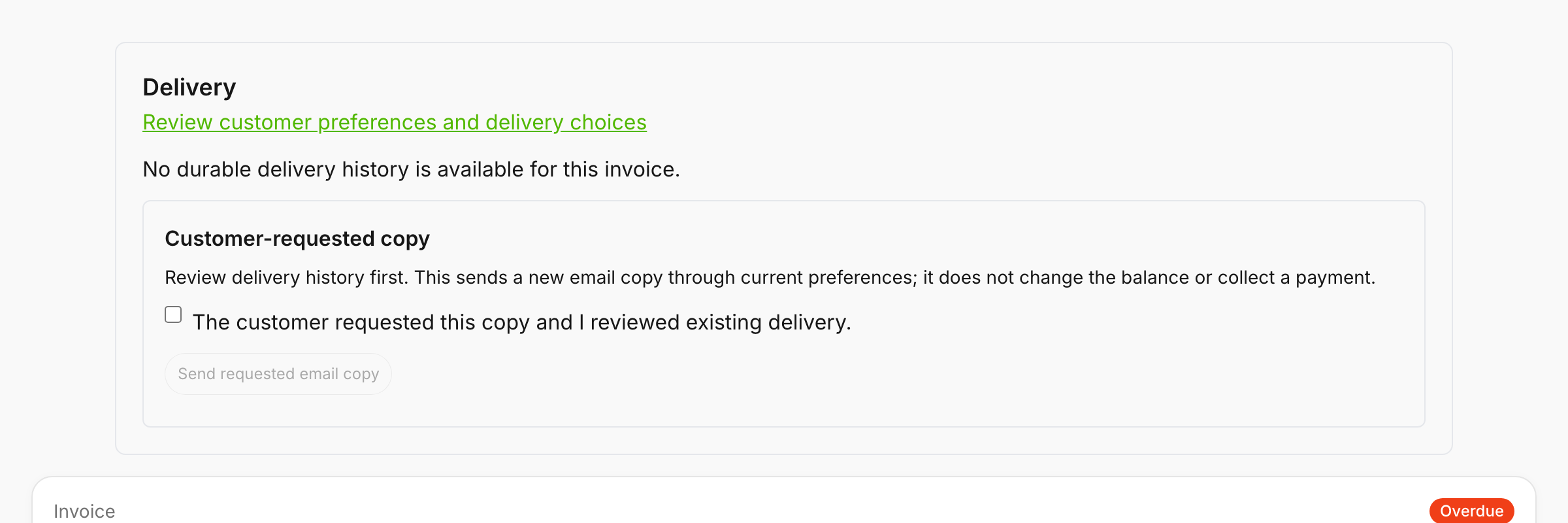
In **Invoices**, click an invoice number to open it. **Delivery** is the first box on the page. Its link, **Review customer preferences and delivery choices**, opens the customer's profile with the **Email preferences** panel open.

Below the link is an entry for each email or text for this invoice: what happened to it (for example **email: skipped**) and why. Each entry ends with a line such as **Latest provider attempt: accepted** or **No provider submission recorded.**, which says whether it was handed to our email or text service.

| What it says                                  | What it means                                                                                        |
| --------------------------------------------- | ---------------------------------------------------------------------------------------------------- |
| **pending**, **preparing**, or **attempting** | It's on its way.                                                                                     |
| **accepted**                                  | Handed off to our email or text service for sending.                                                 |
| **delivered**                                 | The email or text service says it arrived.                                                           |
| **skipped**                                   | Shortcut didn't send it. The line under it says why.                                                 |
| **failed**                                    | It didn't go.                                                                                        |
| **unknown**                                   | Shortcut can't tell whether it went. Don't send another copy until you've checked with the customer. |

Reasons you might see under a line:

| Reason                                                                                                 | What to do                                                                                                                                                                                                                |
| ------------------------------------------------------------------------------------------------------ | ------------------------------------------------------------------------------------------------------------------------------------------------------------------------------------------------------------------------- |
| *Billing email is turned off. Arrange another delivery method.*                                        | The customer turned billing emails off. Get the invoice to them another way.                                                                                                                                              |
| *A spam complaint blocks email. Use another delivery method.*                                          | They marked one of your emails as spam. See [When a customer's email stops working](https://docs.shortcutco.com/readme/leads-prospects-customers/customers-overview-+-importing.md#when-a-customers-email-stops-working). |
| *The address rejected delivery. Verify the address or use another method.*                             | The email bounced. Fix the address on their profile.                                                                                                                                                                      |
| *The email provider still restricts delivery. Permission and provider restoration are separate steps.* | Our email service is still blocking their address. Email us.                                                                                                                                                              |
| *Email delivery is paused for review.* or *Customer communications are paused for this company.*       | Shortcut has paused email for your company. Email us.                                                                                                                                                                     |
| *The provider outcome is unknown. Investigate before sending another copy.*                            | Same as **unknown** above.                                                                                                                                                                                                |

<details>

<summary>Short labels you might see instead of a reason</summary>

* **channel not selected** — that channel wasn't chosen for this send.
* **invalid recipient** — no email or phone on file.
* **settled or void** — the invoice was already paid or voided.
* **payment pending** — waiting while the customer's payment goes through.
* **sms opt out** — they replied STOP.

</details>

{% hint style="info" %}
The Delivery box lists the invoice email and text, each **Remind**, and each requested copy. Emails from automations about the invoice, such as **Invoice Overdue** or an **Overdue invoice recovery** automation, aren't listed here. For an automation, check its **Activity** (see [Automation results, activity, and receipts](https://docs.shortcutco.com/readme/automations/campaign-activity-and-receipts.md)).

An invoice with no delivery record shows *No durable delivery history is available for this invoice.* (in the customer's **Email preferences** panel: *No delivery history yet — older invoices aren't confirmed as delivered.*). That's what you'll see for invoices sent before Shortcut started tracking delivery for your company. It doesn't tell you whether they arrived.
{% endhint %}

<figure><img src="https://2299783971-files.gitbook.io/~/files/v0/b/gitbook-x-prod.appspot.com/o/spaces%2FOhi7KtJ4vY1pDKwWu5SV%2Fuploads%2Fgit-blob-948d70dbb9908fe87a068eb674f973cc7b9392ef%2Finvoice-delivery-panel.png?alt=media" alt="Delivery box at the top of an invoice with the Review customer preferences and delivery choices link, the line No durable delivery history is available for this invoice, and a Customer-requested copy box with a checkbox and a Send requested email copy button"><figcaption><p>Delivery is the first box on the invoice page, with the Customer-requested copy box inside it.</p></figcaption></figure>

## Send a copy the customer asked for

Under the delivery lines is a **Customer-requested copy** box. It isn't there on drafts or void invoices.

{% stepper %}
{% step %}

#### Check what's already gone out

Look at the delivery lines first so you don't send a duplicate.
{% endstep %}

{% step %}

#### Tick the box

**The customer requested this copy and I reviewed existing delivery.**
{% endstep %}

{% step %}

#### Click Send requested email copy

You'll see *Requested copy saved.* Reload the page to see it under **Delivery**.
{% endstep %}
{% endstepper %}

The customer gets an email titled **Requested copy of invoice #1234** with a link to the invoice, which shows the current balance and whether it's paid. It works on paid invoices too, for a customer who wants one for their records.

A requested copy:

* is email only. It never sends a text.
* doesn't change the balance, take a payment, or touch autopay.
* still follows the customer's email preferences. If billing emails are off, it's skipped. Only turn them back on if the customer asks you to.
* waits while a customer's online payment is going through.

If you see *Review unresolved delivery, invoice status, or import review before requesting a copy.*, another email for this invoice is still on its way or its outcome is unknown, or the invoice is a draft, void, or waiting on import review.

## Common questions

<details>

<summary>A customer stopped getting invoices after they unsubscribed</summary>

Open their profile and choose **⋯ → Email preferences**. If the **Billing** switch is off, they turned billing emails off for your company. Ask how they'd like invoices and click **Record agreed method…**. If they want emails again, switch **Billing** on and say how they asked.

If the row says **Not sending — unsubscribed at the email provider**, ask the customer whether they still want billing emails, then click **Confirm with customer…** and record how they asked. That lets billing emails through. Marketing and service emails stay blocked until our email service lifts the block.

</details>

<details>

<summary>How do I get an invoice to someone who's turned billing emails off?</summary>

* **Text it.** **Remind** still texts them the invoice link, as long as they haven't replied STOP. The email part is skipped.
* **The portal.** If they use the customer portal, the invoice is under **Billing**.
* **Paper.** Open the invoice with **View** and print it.

</details>

<details>

<summary>Does this affect text messages?</summary>

No. Email choices never turn texts on or off. Customers stop texts by replying STOP.

</details>

<details>

<summary>Can I turn a customer's emails back on myself?</summary>

Only when they ask you to. Shortcut asks how they asked (on the phone, in person, or in writing) and keeps it in **History**.

</details>

## Related pages

* [Remind / resend an invoice](https://docs.shortcutco.com/readme/finances-invoices-and-payments/remind-resend-an-invoice-after-24-hours.md)
* [How customers pay an invoice](https://docs.shortcutco.com/readme/finances-invoices-and-payments/how-customers-pay-an-invoice.md)
* [Customer portal](https://docs.shortcutco.com/readme/customer-portal.md)
* [Customers overview](https://docs.shortcutco.com/readme/leads-prospects-customers/customers-overview-+-importing.md#when-a-customers-email-stops-working)

<details>

<summary>Still stuck?</summary>

Email **<hello@shortcutco.com>** with the customer's name and the invoice number.

</details>