> For the complete documentation index, see [llms.txt](https://docs.shortcutco.com/llms.txt). Markdown versions of documentation pages are available by appending `.md` to page URLs; this page is available as [Markdown](https://docs.shortcutco.com/readme/finances-invoices-and-payments/how-customers-pay-an-invoice.md).

# How customers pay an invoice

Every invoice Shortcut sends has its own link. Your customer opens it on their phone or computer, sees the work and the total, and pays right there. They don't need an account.

This page walks through what they see, so you can talk a customer through it.

## Notes and photos from the visit

When the crew shared notes, photos, or videos with the customer, they show on the invoice under **Notes from your team**, grouped by visit. Shared before and after photos of the same area, such as *Front yard*, sit side by side. See [Required photos (photo checklist)](https://docs.shortcutco.com/readme/configuration/services-pricing-structures.md#required-photos-photo-checklist).

## The Pay invoice box

Below the invoice details there's a **Pay invoice** box. What's in it depends on the customer's device.

* **Apple Pay or Google Pay.** If their phone or browser has a wallet set up, a wallet button appears at the top of the box. One tap, confirm, done.
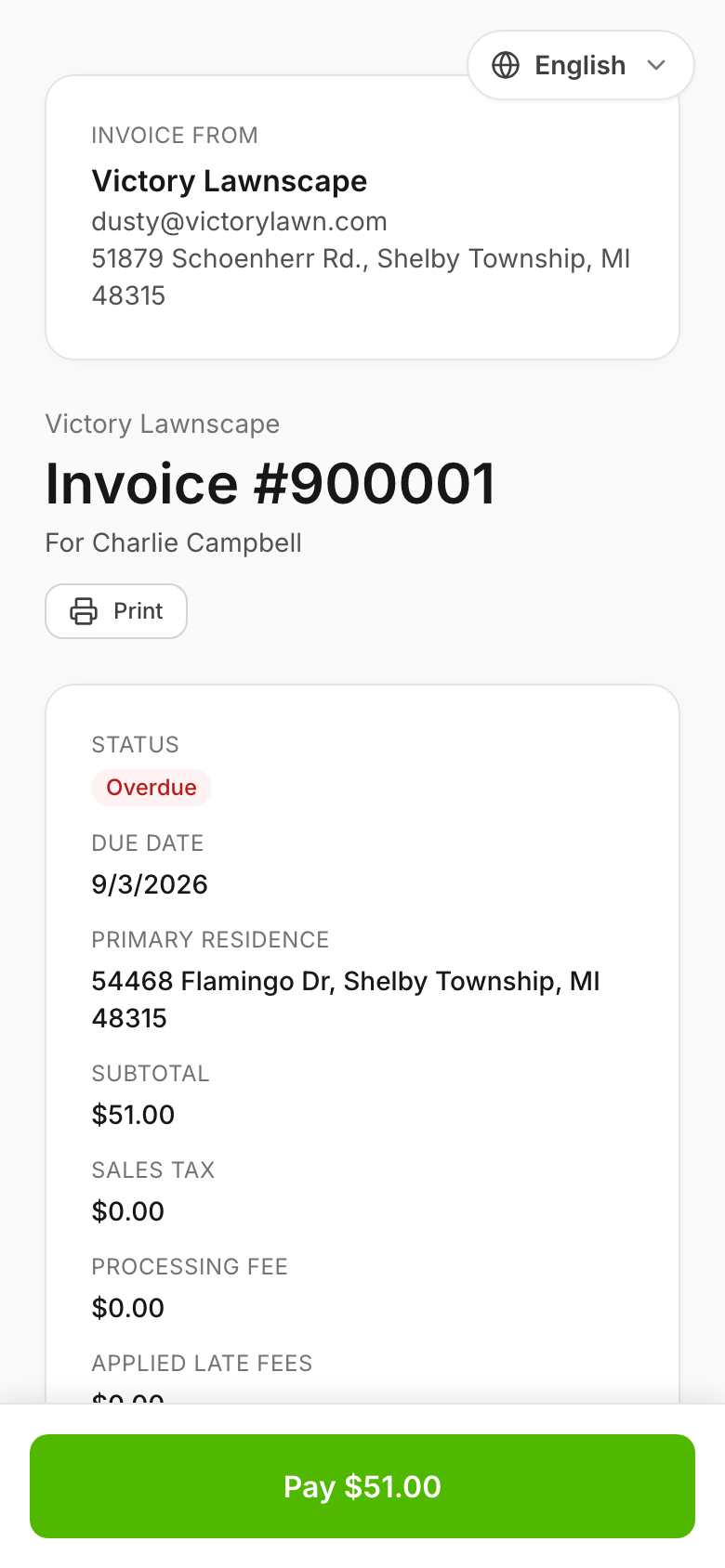
* **A Pay button with the invoice total**, such as **Pay $51.00**. It sits under the wallet button, after **or pay with card**. On a phone it's pinned to the bottom of the screen so it's always in reach, and the box says **Pay button is at the bottom of your screen**.

<figure><img src="https://2299783971-files.gitbook.io/~/files/v0/b/gitbook-x-prod.appspot.com/o/spaces%2FOhi7KtJ4vY1pDKwWu5SV%2Fuploads%2Fgit-blob-9955c7b9eacde1dac153eb3b0a6e9bd002aee234%2Fcustomer-invoice-pay-page-mobile.png?alt=media" alt="Customer invoice #900001 on a phone showing the status, due date and totals, with a green Pay $51.00 button pinned to the bottom of the screen"><figcaption><p>On a phone, the Pay button stays pinned to the bottom of the screen while the customer scrolls the invoice.</p></figcaption></figure>

If you charge a processing fee on card payments only, the box looks different. See [Invoices with a card-only fee](#invoices-with-a-card-only-fee).

## Stripe's checkout page

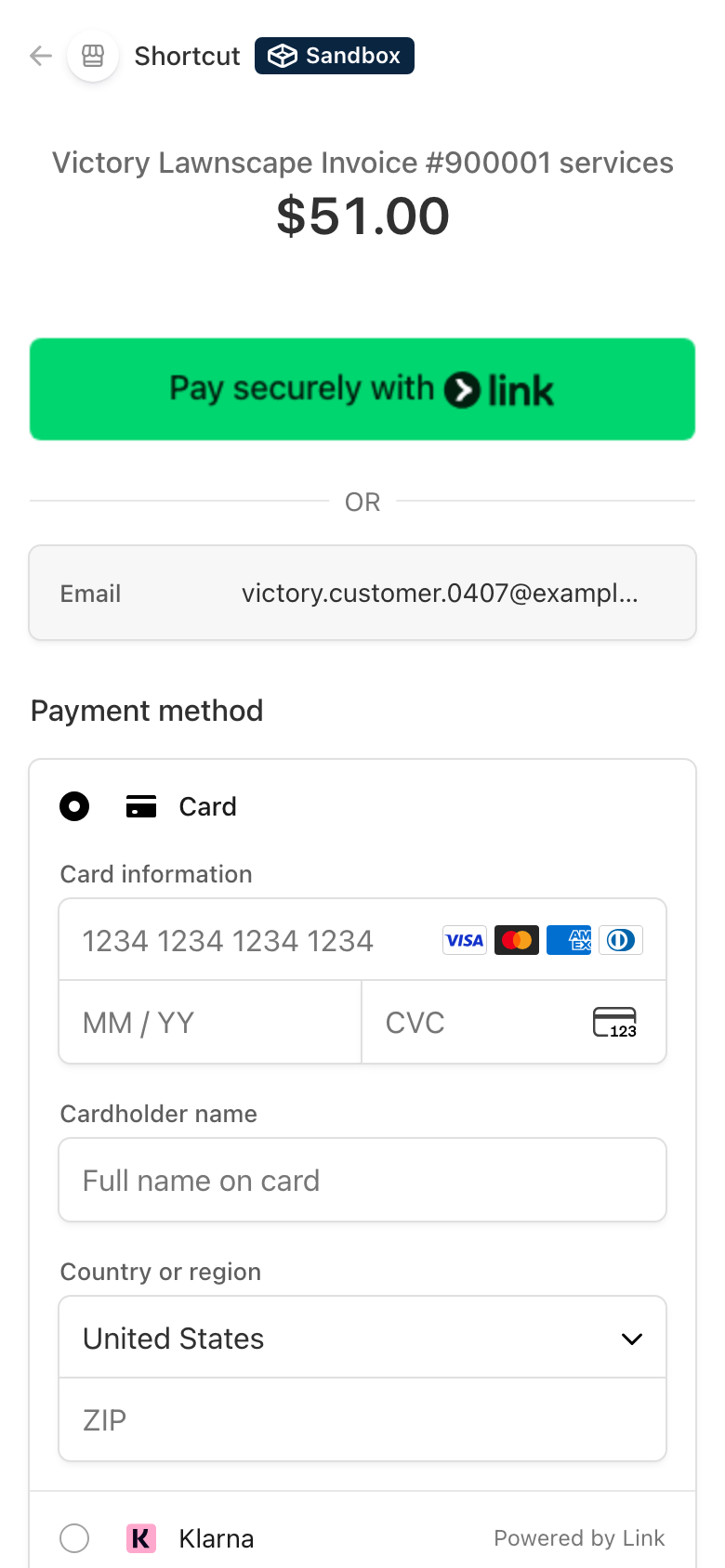
Tapping **Pay $51.00** opens a secure checkout page run by Stripe, your payment processor. The customer enters their card there. Shortcut never sees or stores card numbers.

Stripe's page lists the same amounts as the invoice: the services, then **Sales tax**, **Processing fee**, and **Late fees** if the invoice has them.

Which payment options appear on Stripe's page is decided by Stripe and your Stripe account's payment method settings. Most customers see a card form, and often Apple Pay, Google Pay, **Link**, and **US bank account**.

### Link

Link is Stripe's saved checkout: people save a card once and reuse it on any site that accepts Link. If your customer has saved a card with Link before, anywhere, Stripe can recognize their email, text them a one-time code, and fill the card in. They can also skip Link and type a card in the usual way.

A few things to know:

* Link only shows on Stripe's checkout page. It doesn't appear next to the Apple Pay / Google Pay button on the invoice itself.
* Paying with Link is a one-time payment. It doesn't save a card or turn on autopay.

<figure><img src="https://2299783971-files.gitbook.io/~/files/v0/b/gitbook-x-prod.appspot.com/o/spaces%2FOhi7KtJ4vY1pDKwWu5SV%2Fuploads%2Fgit-blob-815645d58cf79551ee27a52df29bf16d9ae6d182%2Fcustomer-invoice-stripe-checkout-link.png?alt=media" alt="Stripe&#x27;s checkout page on a phone for Invoice #900001, with a Pay securely with Link button above the email field and the card form"><figcaption><p>Stripe's checkout page, shown here in Stripe's test mode. When Stripe offers Link, it sits above the card form.</p></figcaption></figure>

### Paying from a bank account

Stripe's checkout page can also offer **US bank account** (ACH). The customer picks it, connects their bank through Stripe, and agrees to a one-time debit for this invoice. Shortcut never sees their bank login or account number, and the debit doesn't authorize any future charges.

If your processing fee applies to all payments, the total is the same as paying by card, fee included. If it applies to card payments only, a bank payment pays no fee.

**Bank payments take a few business days.** While one is on its way, the **Status** at the top of the invoice changes from **Unpaid** (or **Overdue**) so the customer knows their payment is on its way. A note in the **Pay invoice** box says what's happening:

| Status at the top         | Note in the Pay invoice box                                                                                                                                    | What it means                                                                                                                                                                                  |
| ------------------------- | -------------------------------------------------------------------------------------------------------------------------------------------------------------- | ---------------------------------------------------------------------------------------------------------------------------------------------------------------------------------------------- |
| **Verification needed**   | **Bank verification needed** — *Bank payments can take several business days. No additional payment is needed.* and a **Verify bank account with Stripe** link | Stripe couldn't confirm the account instantly, so it sent a small test deposit. When that shows up on their statement, the customer comes back to the invoice and uses the link to confirm it. |
| **Payment processing**    | **Bank payment processing** — *Bank payments can take several business days. No additional payment is needed.*                                                 | The debit is on its way.                                                                                                                                                                       |
| **Unpaid** or **Overdue** | **Payment failed** — *Your payment did not complete. You can try again below.*                                                                                 | The bank turned the payment down, for example because the account is closed. The pay button comes back so they can try a card or another account.                                              |
| **Paid**                  | **Payment confirmed. Thank you.**                                                                                                                              | The money arrived.                                                                                                                                                                             |

## Invoices with a card-only fee

If you add a processing fee to card payments only (see [Processing fees](https://docs.shortcutco.com/readme/finances-invoices-and-payments/processing-fees-optional.md)), an unpaid invoice shows the fee as **Card processing fee (credit cards only)**, outside the total. The **Pay invoice** box starts with *Credit card payments add a $3.00 processing fee. No fee for bank transfer, debit card, check or cash.* Then:

* **Pay $48.00 by bank** opens Stripe's page for a bank payment, with no fee. It shows when your account takes bank payments.
* **A card form on the invoice page.** The customer types their card and taps **Continue with card (up to $51.00)**. Shortcut checks the card type and shows **Invoice total**, **Card processing fee** (or **No fee for this card** for a debit or prepaid card) and **Charged to your card**. They tap **Pay $51.00 by card** to finish, or **Use a different card**.

There's no Apple Pay or Google Pay button on these invoices, and no trip to Stripe's checkout page for a card. Once a credit card pays, the fee row reads **Card processing fee**. Paid any other way, the fee row is gone.

## After they pay

A card payment is usually recorded by the time the customer comes back from Stripe's page, so the invoice opens as **Paid** with **Payment confirmed. Thank you.** It turns **Paid** in your Invoices list at the same moment.

If it isn't recorded yet, the status at the top reads **Payment processing**, not **Unpaid**, and the note says **Payment submitted. We are confirming it now and this page will update shortly.** The page keeps checking by itself for about three minutes and reloads as **Paid** once the payment is recorded. A card payment usually confirms within a minute or two.

If it still isn't confirmed after about three minutes, the note changes to **Payment submitted. Confirmation is taking longer than usual. No additional payment is needed.** A **Check payment status** button checks again. The customer doesn't need to pay again.

A bank payment doesn't confirm that quickly. Within a minute or two the note changes to **Bank payment processing**, as described above.

If they back out of Stripe's page without paying, the invoice says **Payment was canceled.** and the pay button is still there.

### Their card is saved, and they can turn on autopay

A card the customer pays with, on Stripe's page or with Apple Pay or Google Pay on the invoice, is kept for future payments (Stripe's page says so above **Pay**). Shortcut saves it to the customer's profile, labelled *Saved when the customer paid an invoice*. Paying doesn't turn autopay on.

For 14 days after paying, the paid invoice offers it: *Your Visa ending 4242 is saved for future payments.* with the checkbox **Pay future invoices automatically with this card (autopay)**. When the customer ticks it, the authorization appears, and **Turn on autopay** switches it on and records their consent. The offer doesn't appear when autopay is already on, or for a customer who pays offline.

A payment with Link or from a bank account isn't saved this way.

To collect a card from a customer who has no invoice to pay, send a [payment-method link](https://docs.shortcutco.com/readme/finances-invoices-and-payments/payment-method-links.md).

## Autopay from a bank account

A customer can save a US bank account when they approve an estimate (see [Customer payments → Estimate approval](https://docs.shortcutco.com/readme/configuration/finances-settings-stripe-manual-payments-fees.md#estimate-approval)). If autopay uses that bank account, each new invoice is paid by a bank debit:

* The debit takes a few business days. Until it clears, the invoice reads **Payment processing**, and nothing else can charge it.
* A card-only processing fee is never added to a bank debit.
* If the debit fails, the invoice can be paid again from its link, and autopay won't try that invoice again. The failure shows as an autopay failure in the customer's portal and on their profile. Autopay still runs for their later invoices.

A bank account can't be charged from the office. **Collect payment…** only offers saved cards, so to collect from a bank account, send the invoice and let the customer pay from the link.

## When a payment is already in progress

Once a payment is on its way, the invoice won't take a second one. Instead of the pay button, the customer sees a note:

| What the customer sees                                                                                 | What it means                                                                                                                                                                                                                       |
| ------------------------------------------------------------------------------------------------------ | ----------------------------------------------------------------------------------------------------------------------------------------------------------------------------------------------------------------------------------- |
| **Payment confirmation pending** — *Payment confirmation is pending. No additional payment is needed.* | Stripe has the payment and Shortcut is finishing recording it. This usually clears in moments.                                                                                                                                      |
| **Payment processing** — *Payment confirmation is pending. No additional payment is needed.*           | The card payment is still processing at Stripe.                                                                                                                                                                                     |
| **Bank verification needed** or **Bank payment processing**                                            | A bank payment is on its way. See [Paying from a bank account](#paying-from-a-bank-account).                                                                                                                                        |
| **Payment needs review** — *Please contact the company about this payment. Do not pay again.*          | Something about the payment needs a person to look at it. See [Invoice statuses](https://docs.shortcutco.com/readme/finances-invoices-and-payments/invoice-statuses-explained-paid-unpaid-overdue.md#when-an-invoice-needs-review). |

These notes stop a customer from paying twice. You'll see the same thing on the invoice in your list. See [Payment notes next to the status](https://docs.shortcutco.com/readme/finances-invoices-and-payments/invoice-statuses-explained-paid-unpaid-overdue.md#payment-notes-next-to-the-status).

## Customers who pay offline

If a customer's billing is set to **Offline / Check Payment**, or you haven't connected Stripe, there's no pay button. The invoice shows your **offline payment instructions** instead. See [Customer payments](https://docs.shortcutco.com/readme/configuration/finances-settings-stripe-manual-payments-fees.md). When they pay you, use [Mark paid](https://docs.shortcutco.com/readme/finances-invoices-and-payments/mark-an-invoice-as-paid-manual.md).

## Common questions

<details>

<summary>A customer says there's no pay button</summary>

On a phone, check the bottom of the screen. That's where the button lives. Otherwise, one of these is true:

* The invoice is already paid or void.
* A payment is already in progress. Look for a note in the **Pay invoice** box.
* The customer is on offline billing.
* You issued a credit memo on an invoice that's already partly paid. The box says *A credit was applied to this invoice. To pay the remaining amount, contact \[your company].* Arrange the rest with the customer directly.

</details>

<details>

<summary>A customer turned off your billing emails. Can they still pay?</summary>

Yes. Turning off billing emails only stops the emails. The invoice link still works, the balance is still due, and autopay keeps running. Send them the link another way: **Remind** still texts it, or they can pay from **Billing** in the customer portal. See [Customer email preferences and invoice delivery](https://docs.shortcutco.com/readme/finances-invoices-and-payments/customer-email-preferences.md).

</details>

<details>

<summary>Can I turn Link off?</summary>

Not from Shortcut. Whether Link shows up depends on Stripe and your Stripe account's payment method settings. Email us if you need a hand.

</details>

## Related pages

* [Invoice statuses explained](https://docs.shortcutco.com/readme/finances-invoices-and-payments/invoice-statuses-explained-paid-unpaid-overdue.md)
* [Customer payments (Stripe, offline payments, fees)](https://docs.shortcutco.com/readme/configuration/finances-settings-stripe-manual-payments-fees.md)
* [Collect a card or bank account with a payment-method link](https://docs.shortcutco.com/readme/finances-invoices-and-payments/payment-method-links.md)
* [Customer portal](https://docs.shortcutco.com/readme/customer-portal.md)
* [Customer email preferences and invoice delivery](https://docs.shortcutco.com/readme/finances-invoices-and-payments/customer-email-preferences.md)

<details>

<summary>Still stuck?</summary>

Email **<hello@shortcutco.com>** with the invoice number and a screenshot of what your customer sees.

</details>