> For the complete documentation index, see [llms.txt](https://docs.shortcutco.com/llms.txt). Markdown versions of documentation pages are available by appending `.md` to page URLs; this page is available as [Markdown](https://docs.shortcutco.com/readme/finances-invoices-and-payments/invoice-statuses-explained-paid-unpaid-overdue.md).
# Invoice statuses explained (Paid, Unpaid, Overdue, Void)
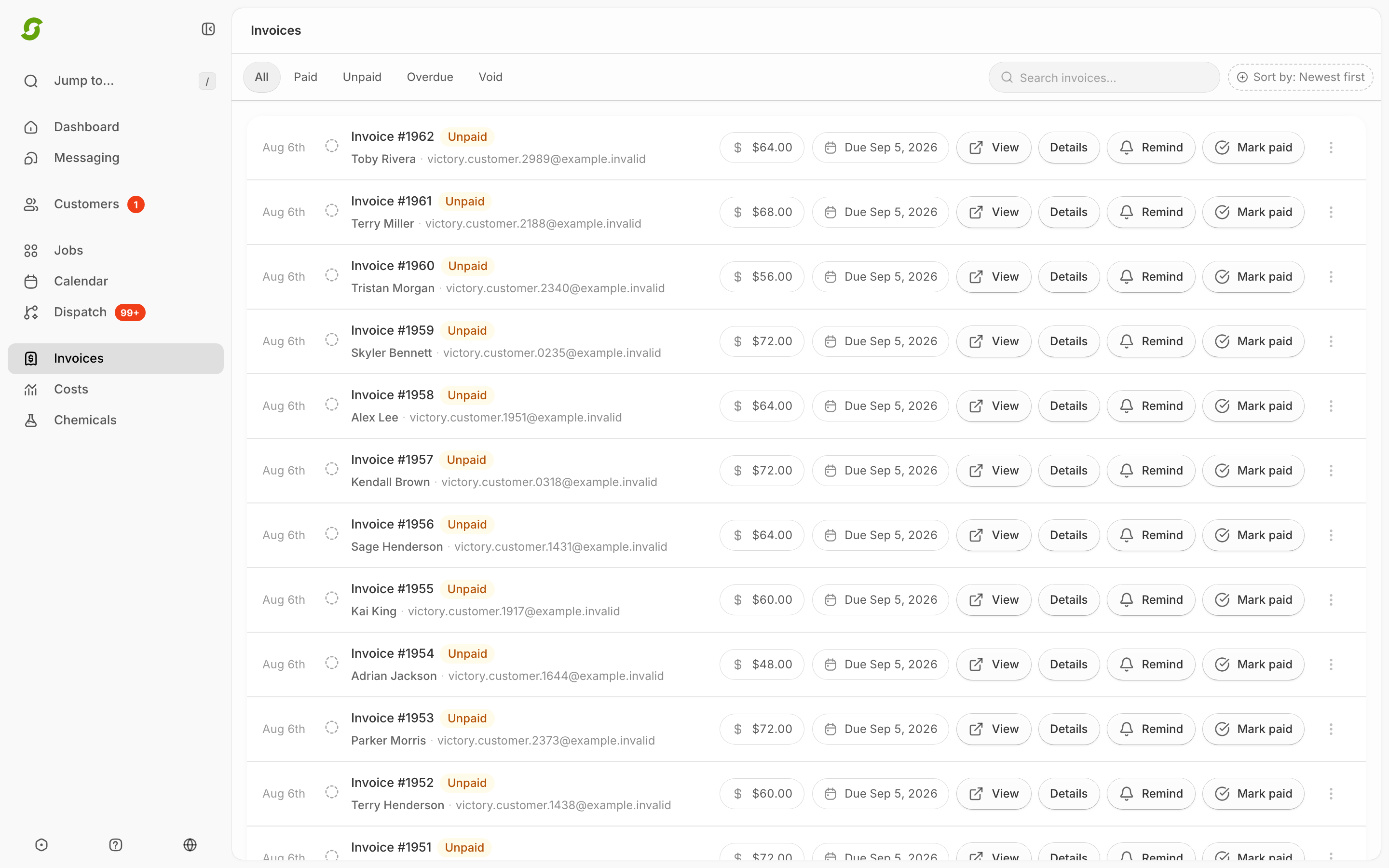
Shortcut shows four statuses in the invoice list. [Open Invoices →](https://shortcutco.com/invoices)
When a customer's bank payment is on its way, the status pill shows **Payment processing** or **Verification needed** instead. For other payments in progress, a short orange note sits beside the status. See [Payment notes next to the status](#payment-notes-next-to-the-status).
## Unpaid
The invoice exists and the customer hasn't paid yet — whether it was just created or sent days ago.
## Paid
Paid in full: online through Stripe (card, Apple Pay, Google Pay, or Link), by autopay, or because you clicked **Mark paid** for an offline payment. An online payment turns the invoice **Paid** as soon as Stripe confirms it.
## Overdue
Unpaid past its **due date**. The due date is the day the invoice went out plus your payment terms (**30 days**, unless you change that in Customer payments). Overdue invoices can trigger reminder automations and late fees, and you'll get an email heads-up. Reminders and late fees hold off while a customer's payment is in progress.
## Void
Canceled. Kept for your records, but the customer no longer owes it. **Void invoice** is in the row's **⋯** menu. For an invoice that's already in QuickBooks and has no payments, **Void and reissue…** voids it and opens a corrected draft; see [Refunds & credit memos](/readme/finances-invoices-and-payments/refunds-and-credit-memos.md).
## Payment notes next to the status
When a customer has started paying online and Shortcut is waiting on Stripe, the invoice shows it in one of two ways.
**A bank payment changes the status pill itself.** The pill reads **Payment processing** (blue) or **Verification needed** in place of **Unpaid** or **Overdue**. You see this in the invoice list, at the top of the invoice when you open it, and on the customer's own invoice page. The invoice still sits under the **Unpaid** or **Overdue** tab until the money arrives.
| Status pill | What's happening | What to do |
| ----------------------- | -------------------------------------------------------------------------------------------- | ----------------------------------------------------------- |
| **Payment processing** | A bank payment is on its way. These take a few business days. | Nothing. The invoice turns **Paid** when the money arrives. |
| **Verification needed** | The customer chose to pay from their bank account and still needs to confirm it with Stripe. | Nothing. The customer finishes it from their invoice. |
**Anything else shows as a short orange note beside the status pill**, for example **Unpaid** **Payment confirmation pending**. The status itself doesn't change until the money is confirmed.
| Note | What's happening | What to do |
| -------------------------------- | ---------------------------------------------------------------------------------------------------------------------------------------------- | ------------------------------------------------------------------------------------------------------ |
| **Payment confirmation pending** | Stripe has the payment, or is about to, and Shortcut is finishing recording it. | Nothing. It usually clears within minutes and the invoice turns **Paid**. |
| **Payment processing** | The card payment is still processing at Stripe. | Nothing. Wait for it to finish. |
| **Payment needs review** | Something doesn't add up: the customer paid twice, paid an invoice you'd already voided, or paid an amount that no longer matches the invoice. | Open the invoice and follow the steps below. |
| **Payment failed** | The customer's bank payment didn't go through. The pill is back to **Unpaid** or **Overdue**. | Nothing needed. The customer can pay again from the same invoice. If they don't, remind them as usual. |
While a payment is in progress, Shortcut holds off on anything that would chase the customer for money:
* **Remind**, **Mark paid**, and **Void invoice** are hidden on that invoice.
* Overdue reminder automations wait. They pick back up if the payment doesn't go through.
* No new late fee is added.
* Autopay won't try to charge that invoice.
More about bank payments
While a bank payment is being verified or processed, the invoice keeps its due date. Any late fee that would have landed during those days is skipped, not added later. If a bank payment fails:
* The customer can pay again from the same invoice.
* Your **Payment Failed** automation, if you have one, runs once for that attempt. It doesn't run if a newer payment has already gone through.
* Autopay will never charge that invoice. The customer's autopay still works for their other invoices.
If a bank reverses a payment after it cleared, the invoice shows **Payment needs review**. See [When an invoice needs review](#when-an-invoice-needs-review).
The same buttons are also hidden, with no note, while a customer has Stripe's checkout page open but hasn't finished paying. Stripe closes an unfinished checkout after 24 hours, and the buttons come back shortly after.
### When an invoice needs review
Click the invoice number to open it. Under the **Delivery** box at the top, a **Payment needs review** box tells you what to do:
1. Click **Review in Stripe** to open the payment in your Stripe account.
2. Sort the payment out in Stripe (for example, refund a duplicate) and fix your accounting records to match.
3. Then clear it in Shortcut:
* **If the invoice is paid or void**, click **Acknowledge resolved review**. The note clears. Nothing about the invoice's total, status, or payments changes.
* **If the invoice is still unpaid**, refund every payment on it in Stripe first and wait until the refunds show up in Shortcut. Then click **Verify full refunds and void unpaid invoice** and type the invoice total to confirm. Shortcut checks that everything was refunded, then voids the invoice. If you still need to bill the customer, send a new invoice.
## Delivery is separate from status
The status tells you about payment, not whether the customer got the invoice. To check delivery, click the invoice number and look at the **Delivery** box at the top. If a customer has turned off billing emails, Shortcut stops emailing them invoices, but the invoice stays **Unpaid** or **Overdue** until it's paid. See [Customer email preferences and invoice delivery](/readme/finances-invoices-and-payments/customer-email-preferences.md).
## Where you see these
* Tabs at the top of Invoices: **All · Paid · Unpaid · Overdue · Void**
* A **Pending** section above the list holds completed-but-uninvoiced work (scheduled/offline customers) — that's work waiting to become an invoice, not an invoice status.
* Prepay invoices carry the same statuses. On the customer's profile, the line under their numbers shows **Prepaid** while a paid prepay covers their work, or **Prepay pending** until it's paid.
Status pills help distinguish unpaid, paid, and prepay invoices.
{% hint style="info" %}
### Tips
* With **Stripe**, statuses update automatically when a customer pays online. You don't need to do anything.
* With offline payments (check/cash), click **Mark paid** so reminders stop.
* A **Payment processing** or **Verification needed** pill, or an orange note next to the status, means a payment is on its way. Don't send a reminder or take a second payment until it clears.
{% endhint %}
## Common issues
"Payment confirmation pending" won't clear
Open the invoice. If you see **Recover an original Stripe payment**, Shortcut didn't get Stripe's reply for that payment. Look for the payment in your Stripe account. If you find it, paste its ID (it starts with `cs_` or `pi_`) into **Original Stripe ID** and click **Verify original payment**. Shortcut checks that it matches this invoice and customer, then catches up. If you can't find it, email us. Don't charge the customer again.
## Related pages
* [Mark an invoice as paid (offline payments)](/readme/finances-invoices-and-payments/mark-an-invoice-as-paid-manual.md)
* [Remind / resend an invoice](/readme/finances-invoices-and-payments/remind-resend-an-invoice-after-24-hours.md)
* [Billing modes](/readme/finances-invoices-and-payments/billing-modes.md)
* [How customers pay an invoice](/readme/finances-invoices-and-payments/how-customers-pay-an-invoice.md)
* [Customer email preferences and invoice delivery](/readme/finances-invoices-and-payments/customer-email-preferences.md)
Still stuck?
Email **** with the customer name + invoice status + payment date (if paid).