> For the complete documentation index, see [llms.txt](https://docs.shortcutco.com/llms.txt). Markdown versions of documentation pages are available by appending `.md` to page URLs; this page is available as [Markdown](https://docs.shortcutco.com/readme/finances-invoices-and-payments/mark-an-invoice-as-paid-manual.md).
# Mark an invoice as paid (offline payments)
Use this when you were paid outside of Shortcut (for example: check, cash, or a bank transfer).
## When to use this
* A customer mailed a check
* A customer paid cash
* You recorded payment somewhere else and want Shortcut to stop showing it as unpaid
## Steps
{% stepper %}
{% step %}
### Go to **Invoices**
{% endstep %}
{% step %}
### Find the invoice in the list
The **Unpaid** and **Overdue** tabs narrow it down.
{% endstep %}
{% step %}
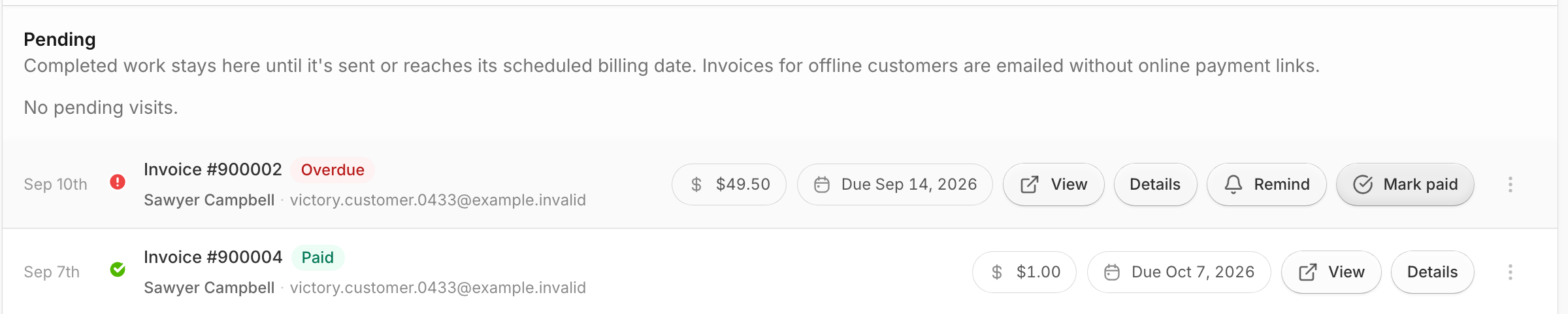
### Click **Mark paid**
Use Mark paid to stop reminders after an offline payment.
{% endstep %}
{% endstepper %}
## Expected result
The invoice status becomes **Paid**, a receipt goes to the customer, and reminders stop.
{% hint style="info" %}
Mark paid records a payment for the full amount. It isn't available when the invoice was already paid online through Stripe, or while a customer's online payment is in progress. That includes while they have Stripe's checkout page open without finishing (Stripe closes it after 24 hours). See [Payment notes next to the status](/readme/finances-invoices-and-payments/invoice-statuses-explained-paid-unpaid-overdue.md#payment-notes-next-to-the-status).
{% endhint %}
## Marked the wrong invoice, or the check bounced?
Open the row's **⋯** menu and choose **Undo payment**. Type a reason and confirm: the payment is removed, the invoice is open again, and the customer isn't notified. This is only offered for a payment you recorded by hand — to return a card or bank payment, use **Refund…**. See [Refunds & credit memos](/readme/finances-invoices-and-payments/refunds-and-credit-memos.md).
{% hint style="warning" %}
### Why this matters
If you don’t mark a manual payment as paid, automated messages can keep asking the customer to pay—even though you already received the money.
{% endhint %}
## Related pages
* [Finances overview (invoice list + filters)](/readme/finances-invoices-and-payments/finances-overview-invoice-list-+-filters.md)
* [Invoice statuses explained](/readme/finances-invoices-and-payments/invoice-statuses-explained-paid-unpaid-overdue.md)
Still stuck?
Email **** with the customer name + a screenshot of the invoice list.