> For the complete documentation index, see [llms.txt](https://docs.shortcutco.com/llms.txt). Markdown versions of documentation pages are available by appending `.md` to page URLs; this page is available as [Markdown](https://docs.shortcutco.com/readme/finances-invoices-and-payments/remind-resend-an-invoice-after-24-hours.md).
# Remind / resend an invoice
If a customer didn’t see an invoice (or hasn’t paid yet), you can resend it using **Remind**.
## When to use this
{% hint style="info" %}
* The customer says they didn’t receive the invoice
* The invoice is still unpaid and you want to follow up
{% endhint %}
## Before you start
{% hint style="warning" %}
* The invoice must exist in **Invoices** and not be paid or void
{% endhint %}
## Steps
{% stepper %}
{% step %}
### Open Invoices
Click **Invoices** in the left menu.
{% endstep %}
{% step %}
### Find the invoice
Use the tabs (**Unpaid**, **Overdue**) or search to find it.
{% endstep %}
{% step %}
### Click Remind
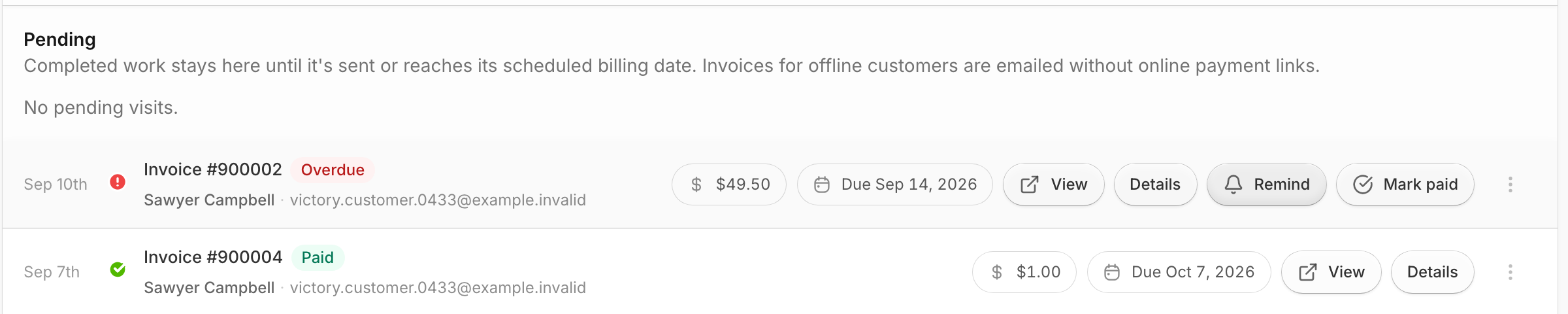
Click **Remind** on the invoice row. It sends straight away; there's no confirmation step. The button says **Sending...** for a moment.
On a phone, **Remind** is the main button on overdue invoices. On other unpaid invoices it's in the **⋮** menu.
Use Remind from the invoice row when a customer needs another payment link.
{% endstep %}
{% endstepper %}
## Expected result
The customer gets the same invoice link again, by email and by text. The email's subject starts with **Reminder:**, for example *Reminder: Invoice #1301 from Mow Money: Lawn Maintenance on Sep 23 — $45.00*. See [What the invoice email looks like](/readme/finances-invoices-and-payments/how-invoices-are-created-job-driven.md#what-the-invoice-email-looks-like).
A message appears at the top of the list, for example **Reminder queued via email and sms.** "Queued" means Shortcut has handed it off for sending. It usually goes out within a minute or two, but it doesn't mean the customer has read it. If an email address or phone number isn't on file, the message says so, for example **SMS skipped: no client phone on file.**
Other messages you might see, there or in the invoice's **Delivery** box:
* **Reminder request recorded.** Shortcut saved the request and will send it as soon as it can.
* **Reminder already accepted by the delivery provider.** You clicked twice; the first one already went out.
* **Email skipped: email suppressed.** The customer's address has bounced or been marked as spam.
* **SMS skipped: customer opted out.** They've replied STOP.
* **Email: delivery needs attention.** The send failed, or it's not clear whether it went. Shortcut is alerted automatically.
Shortcut checks the invoice right before sending. If it was paid or voided in the meantime, the reminder isn't sent.
**Queued doesn't always mean emailed.** Shortcut checks the customer's email preferences when it sends. If they've turned off billing emails, or their address has bounced or been marked as spam, the email is skipped. The text still goes out as usual. When Shortcut can already tell the email will be held back, the message says so, for example **Reminder queued via sms. Email will not be sent: Billing email is turned off. Arrange another delivery method.** To check, open their profile and choose **⋯ → Email preferences**. See [Customer email preferences and invoice delivery](/readme/finances-invoices-and-payments/customer-email-preferences.md).
To see what happened to each email and text, open the invoice and look at its **Delivery** box. See [The Delivery box on an invoice](/readme/finances-invoices-and-payments/customer-email-preferences.md#the-delivery-box-on-an-invoice).
Automated overdue reminders are separate. See [Automations](/readme/automations.md).
## Common issues
No Remind button
Either the invoice is already paid or void, or a payment is in progress. Look for a **Payment processing** or **Verification needed** status, or an orange note next to the status, such as **Payment confirmation pending**. Remind is also hidden while a customer has Stripe's checkout page open without finishing. It comes back once Stripe closes that page, within about a day. See [Payment notes next to the status](/readme/finances-invoices-and-payments/invoice-statuses-explained-paid-unpaid-overdue.md#payment-notes-next-to-the-status).
Customer still can’t find it
Confirm their email/phone is correct in their profile, then remind again.
## Related pages
* [Finances overview (invoice list + filters)](/readme/finances-invoices-and-payments/finances-overview-invoice-list-+-filters.md)
* [Invoice statuses explained](/readme/finances-invoices-and-payments/invoice-statuses-explained-paid-unpaid-overdue.md)
* [Customer email preferences and invoice delivery](/readme/finances-invoices-and-payments/customer-email-preferences.md)
## Still stuck?
If you still need help, email with a screenshot of the invoice row.