> For the complete documentation index, see [llms.txt](https://docs.shortcutco.com/llms.txt). Markdown versions of documentation pages are available by appending `.md` to page URLs; this page is available as [Markdown](https://docs.shortcutco.com/readme/finances-invoices-and-payments/sales-tax.md).

# Sales tax

Charge one sales tax rate on every invoice, or let Shortcut work out the tax at each property's address. Mark customers tax exempt.

Shortcut adds sales tax to invoices for you. You choose how it's worked out:

* **One rate for every customer.** One percentage on every invoice. This is the default.
* **Calculate by property address.** Shortcut looks up the state, county, city and district tax at each property, for each kind of service. Growth and Optimize plans.

Either way, tax is:

* Worked out on the **taxable lines** of the invoice. A visit discount is shared across the visit's lines in proportion to their amounts before tax is worked out.
* Added **before** processing fees.
* Rounded to the nearest cent.
* Shown on the invoice as its own line.

**Invoice total formula:**

```
Total = Subtotal + Sales Tax + Processing Fee
```

If your processing fee applies to card payments only, it isn't part of the total. It's added only when a customer pays by credit card. See [Processing fees](https://docs.shortcutco.com/readme/finances-invoices-and-payments/processing-fees-optional.md).

Tax is worked out when the invoice is created and saved on it. It's the same however the customer pays: online, by autopay, or by check or cash that you record with **Mark paid** or **Record paid**.

***

## One rate for every customer

1. Open **Settings → Customers → Customer payments**.
2. Under **Charges on invoices**, find **Sales tax**.
3. Enter your rate as a percentage (e.g., `8.25` for 8.25%).
4. Click **Save payment settings** at the bottom of the page.

The rate applies to new invoices from then on. Invoices that already exist keep their original tax.

Service lines are always taxed at this rate. [Products](https://docs.shortcutco.com/readme/products.md) with **Taxable** turned off are left out.

To stop charging sales tax, clear the field or set it to `0`, then save.

<figure><img src="https://2299783971-files.gitbook.io/~/files/v0/b/gitbook-x-prod.appspot.com/o/spaces%2FOhi7KtJ4vY1pDKwWu5SV%2Fuploads%2Fgit-blob-ac75ff488ede40825870f6ec1fbc2afdd330700f%2Fsales-tax-setting.png?alt=media" alt="Customer Payments settings with sales tax percentage"><figcaption><p>Set the company-wide sales tax percentage in Customer Payments.</p></figcaption></figure>

***

## Calculate by property address

Shortcut asks Stripe Tax, on your own Stripe account, what the tax is at each property. You need:

* the **Growth** or **Optimize** plan;
* [Stripe connected](https://docs.shortcutco.com/readme/configuration/finances-settings-stripe-manual-payments-fees.md), on a US Stripe account;
* to be registered to collect sales tax in the states you choose.

Stripe charges your Stripe account $0.05 each time Shortcut looks up the tax for an address, about once a month for each property you service. Shortcut adds no fee.

<figure><img src="https://2299783971-files.gitbook.io/~/files/v0/b/gitbook-x-prod.appspot.com/o/spaces%2FOhi7KtJ4vY1pDKwWu5SV%2Fuploads%2Fgit-blob-18a31b781abd70747e5b71f8aaf148356297cea9%2Fsales-tax-how-worked-out.png?alt=media" alt="The How sales tax is worked out card at the bottom of Customer payments, with One rate for every customer chosen, Calculate by property address beside it, and a note: Connect Stripe above to calculate sales tax by address. It runs on your Stripe account."><figcaption><p>Until Stripe is connected, the card keeps one rate for every customer.</p></figcaption></figure>

### Turn it on

1. Open **Settings → Customers → Customer payments** and scroll to the bottom.
2. Under **How sales tax is worked out**, choose **Calculate by property address**.
3. Check your **Business address**. If your Stripe account already has one, it's shown here and you change it in Stripe.
4. Under **States where you collect sales tax**, tick only the states where you're already registered. Properties in other states are charged $0 tax.
5. Pick a **Default service category**. It's used for services that don't have a category of their own.
6. Under **Stripe's fee**, tick **I understand**.
7. Click **Save sales tax**.

Shortcut starts looking up the rate for each property right away. Keep the **Sales tax** percent under **Charges on invoices** filled in. It's used only for a property whose rate hasn't been looked up yet, and those invoices are flagged for you to check.

To go back, choose **One rate for every customer** and click **Save sales tax**. Invoices already created keep their tax.

### Tax categories on services and products

States tax different kinds of work differently, so each service and product has a **Sales tax category**. It shows on the service and product forms while you calculate by address.

| Category                         | For                                                                    |
| -------------------------------- | ---------------------------------------------------------------------- |
| **Lawn and grounds maintenance** | Mowing, fertilizer and weed applications, cleanups, trimming, aeration |
| **Landscaping**                  | Landscape installation and grounds work                                |
| **Pest control**                 | Insect, rodent and other pest treatments                               |
| **General services**             | Snow and ice removal, and services that fit nothing else               |
| **Materials and goods**          | Products sold to the customer                                          |
| **Not taxable**                  | Never charged sales tax                                                |

The first choice, **Default (…)**, follows your **Default service category**. Snow services default to **General services**, and products default to **Materials and goods**. A product with **Taxable** turned off is never taxed.

### The rate at each property

On a customer's profile, open a property. **Sales tax here** shows the rate for your default category and how it splits, for example *7.875% — Minnesota 6.875, Willmar 0.5*, and when it was last checked.

To charge your own rate at one property, type it in **Use a set rate here**. It applies to every taxable service and product there. Leave it empty to use the address lookup.

If a property shows *Add a ZIP code to this address to look up its tax.*, add the ZIP code to its address.

### Invoices to check

When a property's rate couldn't be looked up, the invoice uses your one-rate percent instead. Open the invoice: under the tax amount it says **Sales tax used the flat rate:** and why, such as *Property address has no ZIP code*. Fix the cause, and the next invoices use the address rate.

***

## Tax-exempt customers

1. Open the customer's profile and choose **⋯ → Edit customer details**.
2. Tick **Tax exempt**.
3. Optionally, add the **Exemption certificate or reason**.
4. Click **Save**.

<figure><img src="https://2299783971-files.gitbook.io/~/files/v0/b/gitbook-x-prod.appspot.com/o/spaces%2FOhi7KtJ4vY1pDKwWu5SV%2Fuploads%2Fgit-blob-833d2f5a6945c171576bf1b0f2154db5a5dc399b%2Fcustomer-edit-profile-tax-exempt.png?alt=media" alt="The Edit Customer Profile window: name, company, email and phone, then Invoicing set to Use company default, Invoices across properties set to Company default (one invoice per property), Bills by invoice unticked, Tax exempt ticked, and Exemption certificate or reason filled in as Indiana ST-105 certificate on file, with Cancel and Save"><figcaption><p>Tick Tax exempt in Edit Customer Profile, and note the certificate or reason.</p></figcaption></figure>

Their invoices carry no sales tax, whichever way you work out tax. Their profile shows a **Tax exempt** badge. Hover over it to see the certificate or reason.

***

## What customers see

On the invoice page and on Stripe's checkout page, sales tax is its own line between the subtotal and the total:

|                   | Amount      |
| ----------------- | ----------- |
| Service A         | $80.00      |
| Service B         | $40.00      |
| **Subtotal**      | **$120.00** |
| Sales tax (8.25%) | $9.90       |
| Processing Fee    | $3.50       |
| **Total Due**     | **$133.40** |

When tax is calculated by address, the line lists each part under it, such as *Minnesota 6.875%* and *Willmar 0.5%*. If the invoice's lines are taxed at different rates, the line reads **Sales tax** without a percent. A tax-exempt customer sees **Sales tax (exempt)**.

<figure><img src="https://2299783971-files.gitbook.io/~/files/v0/b/gitbook-x-prod.appspot.com/o/spaces%2FOhi7KtJ4vY1pDKwWu5SV%2Fuploads%2Fgit-blob-7923fcc812284e7e766cfa962a4f86e585590a7a%2Fcustomer-invoice-sales-tax.png?alt=media" alt="Customer invoice page showing tax line"><figcaption><p>Customers see sales tax as a separate line on the invoice.</p></figcaption></figure>

### In invoice previews

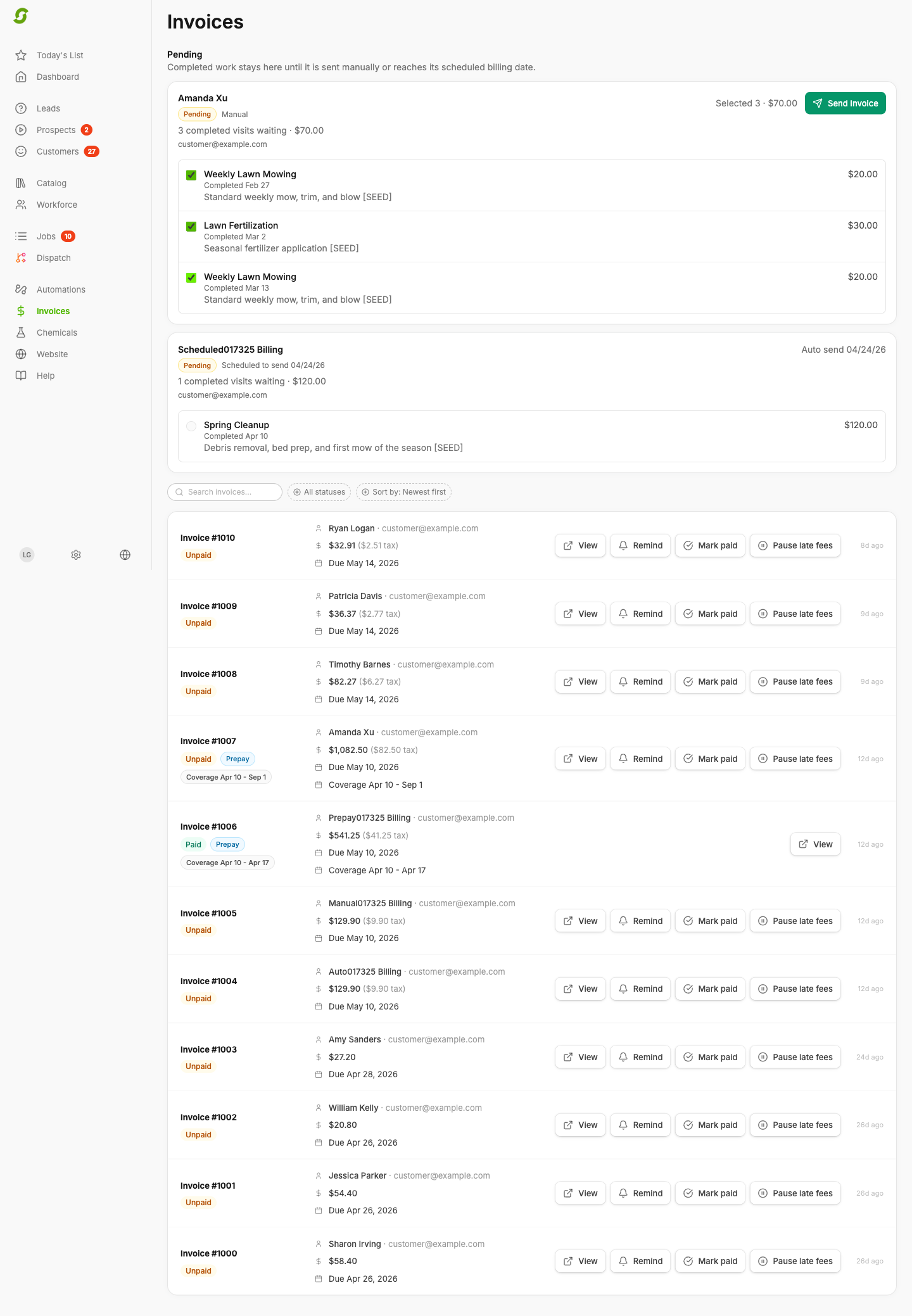
Before sending an invoice, the preview shows the tax so you can check it first.

<figure><img src="https://2299783971-files.gitbook.io/~/files/v0/b/gitbook-x-prod.appspot.com/o/spaces%2FOhi7KtJ4vY1pDKwWu5SV%2Fuploads%2Fgit-blob-646486d5fdbedf5e5492200e5b9203e727aa4d34%2Finvoice-preview-sales-tax.png?alt=media" alt="Invoice list showing sales tax amounts"><figcaption><p>Review invoice tax before following up with a customer.</p></figcaption></figure>

***

## Sales tax across billing modes

Tax works the same whichever [billing mode](https://docs.shortcutco.com/readme/finances-invoices-and-payments/billing-modes.md) creates the invoice. It's worked out when the invoice is created: at job completion for **Auto - on completion**, when you click **Issue Invoice** for **Offline / Check Payment**, on the billing date for **Auto - on a schedule**, and when you create the prepay invoice for [pre-pay](https://docs.shortcutco.com/readme/finances-invoices-and-payments/pre-pay-invoicing.md).

Estimates show the sales tax too, with **Subtotal**, **Sales tax** and **Total**. A sent estimate keeps the rate it was sent with. The invoices that follow use the rate in effect when each one is created. See [Sales tax on the estimate](https://docs.shortcutco.com/readme/proposals/how-to-create-and-send-a-proposal.md#sales-tax-on-the-estimate).

[Projects](https://docs.shortcutco.com/readme/projects.md) invoices use the tax rates you set in Projects.

***

## Filing

Shortcut doesn't file tax returns. The **Sales Tax Liability** report in [Reports](https://docs.shortcutco.com/readme/reports.md) shows taxable revenue, exempt revenue and tax collected for the period. With tax calculated by address, it also lists the tax by jurisdiction.

<details>

<summary>How tax is rounded</summary>

Tax amounts are rounded to the nearest cent using standard rounding (amounts ending in 0.5 cents round up). For example:

* $120.00 subtotal at 8.25% = $9.90
* $75.00 subtotal at 7.5% = $5.63 (rounded from $5.625)

</details>

<details>

<summary>Still stuck?</summary>

Email **<hello@shortcutco.com>** with the invoice number and a screenshot of your sales tax settings.

</details>